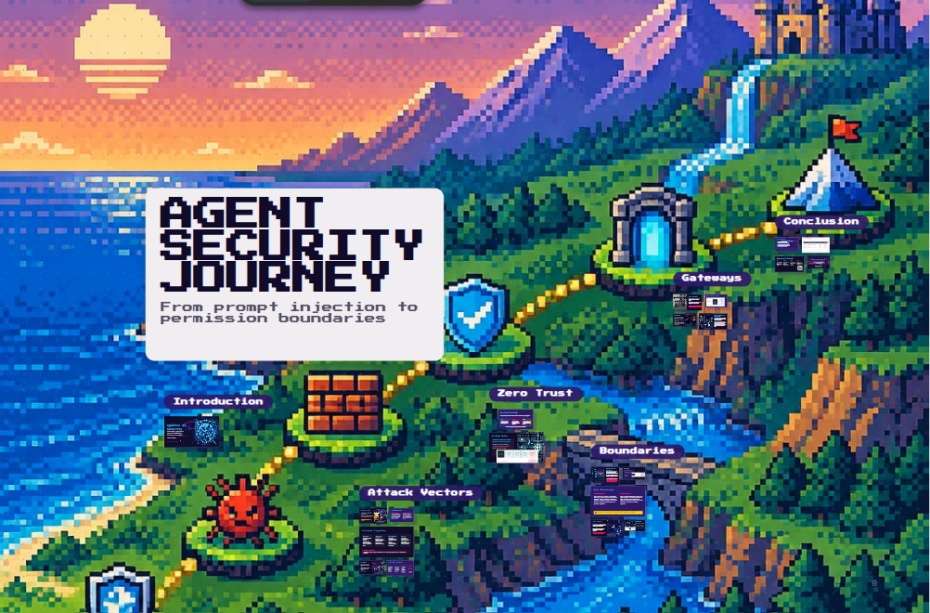
Last Saturday, 17 October 2026, I gave a talk at the DevNot Developer Summit in Istanbul called “From Prompt Injection to Permission Boundaries: Security for AI Agents.” This post is the written version, with a few extra notes I didn’t have time to say on stage.
Why agent security is different now
A chatbot that gives a bad answer is embarrassing. An agent that takes a bad action is an incident.
Agents don’t just generate text anymore. They call tools, hit APIs, write to databases, send emails and open pull requests. That changes the threat model completely. With tools attached, a prompt injection is no longer a text exploit; it can become an unauthorized state change in your systems.
The framing I want you to keep for the rest of this post is simple:
LLMs are untrusted planners. The model proposes actions; deterministic policy decides whether they run. Prompt defense alone is not enough.
Everything below follows from that one idea.
Prompt injection: the gateway attack
Prompt injection is the attack vector everyone talks about, and for good reason. It comes in four main flavours:
- Direct jailbreaks: the user types input designed to override the system prompt.
- Indirect injection: hidden instructions sit inside emails, web pages or documents the agent reads.
- Retrieval (RAG) poisoning: an attacker plants content in your knowledge base so it gets retrieved later.
- Multi-turn manipulation: gradual steering across a conversation that slowly erodes guardrails.
The key point: prompt injection is the vector, but the permissions and data access you give the agent decide the impact.
How indirect injection works
The dangerous part is that the attack doesn’t have to come through the chat box. It rides in on data the agent reads:
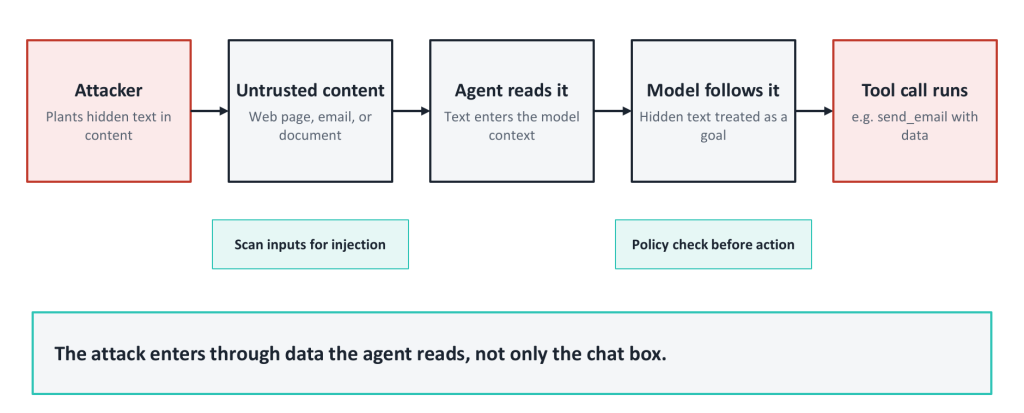
- Attacker plants hidden text in content: a web page, an email, a PDF.
- Agent reads it. The untrusted text enters the model’s context.
- Model follows it. The hidden text is treated as a goal, sometimes as if it were the primary system directive.
- Tool call runs. For example, send_email with your data attached.
There are two places to break this chain: scan inputs for injection before they reach the model, and run a policy check before any action executes. You want both.
Tools worth evaluating for input scanning: Lakera Guard, Azure Prompt Shields, AWS Bedrock Guardrails, NVIDIA NeMo Guardrails and Guardrails AI.
Tool abuse: where the real damage happens
Agents gain their power through tools, and that is exactly why tool abuse is the bigger threat. Common failures look like this:
- Over-broad APIs (one tool that can do far more than the task needs)
- Chained actions that add up to something nobody intended
- Unintended deletes or sends
A compromised LLM means compromised tools. Misleading tool outputs and sensitive context leaking into the model add risk on top.
The tool abuse lifecycle
Here is the scenario I walked through on stage:
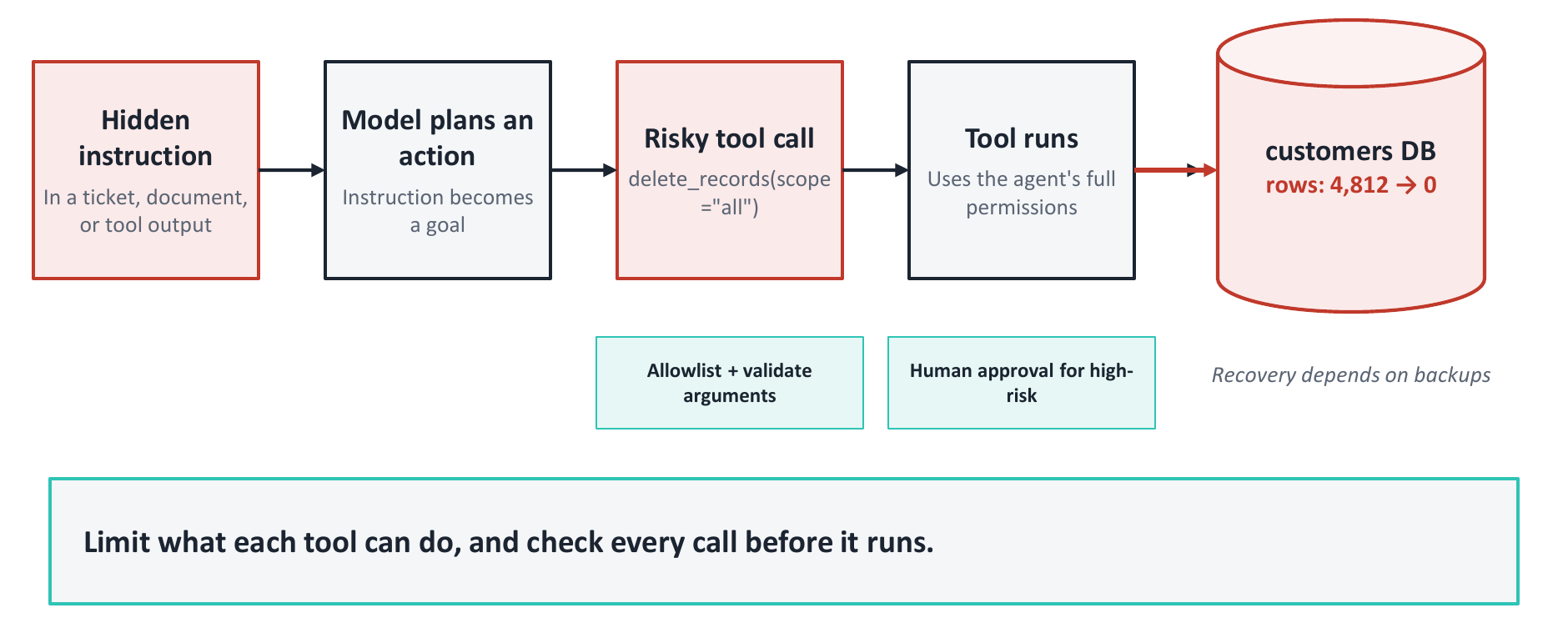
- Goal. The agent reads untrusted input. A hidden instruction in a GitHub ticket or document gets interpreted as a legitimate task.
- Action. The model plans around that goal and generates a high-risk MCP tool call: delete_records(scope=”all”).
- Impact. The tool runs with the agent’s full permissions. Without boundaries, DELETE * FROM CUSTOMERS simply succeeds.
- Database. Rows go from 4,812 to 0. And then someone says the worst sentence in operations: “We don’t have any backups.”
The fixes map directly onto the steps: allowlist tools and validate their arguments, require human approval for high-risk actions, and make sure recovery doesn’t depend on luck. Limit what each tool can do, and check every call before it runs.
Policy engines and controls to look at: Cedar, OPA (Rego), OpenFGA, and MCP gateways with tool allowlists.
Permission boundaries: guardrails, not trust
If you take one thing from this post, take this: enforce security policy outside the model. Never rely on the prompt for safety.
- Define what each agent may read, write and execute. Deny by default.
- Give tools scoped permissions, not god-mode API keys.
- Give agents role-based access.
- Require human approval for high-risk actions.
- Validate every tool call.
Why outside the prompt? Because policy that lives outside the prompt doesn’t move when the model or the instructions change. Swap the model, rewrite the system prompt, get injected: what the agent is allowed to do stays the same.
An access map for a coding agent
Here’s what default-deny looks like for an agent doing agentic development:
| Resource | Access |
|---|---|
| Feature branch | ✓ Read and write |
| Unit test runner | ✓ Run |
| Docs and issue tracker | ✓ Read |
| Production database | ✗ Denied |
| Customer data (PII) | ✗ Denied |
| Payment API | ✗ Denied |
Grant only what the task needs. Everything else stays closed.
Data boundaries matter too
Permissions on tools are half the story. The other half is what data flows in and out.
Enforcement (before the model sees anything):
- Apply user, tenant and document-level permissions before retrieval, not after.
- Minimize how much sensitive data enters the model context. Less in context means a smaller blast radius if things go wrong.
Inspection (on the way out):
- Treat model-generated SQL, HTML and shell commands as untrusted input, exactly like user input.
- Inspect tool responses and outbound content, and redact where appropriate.
- Check both the destination and the data being sent.
My favourite line from this part of the talk: permission to send email is not permission to send every document.
Agents need their own identities
Too many agents today run on a shared service account or, worse, a developer’s personal token. That makes every action untraceable.
- Give each agent its own unique, non-shared identity.
- Scope, rotate and audit tokens per agent and per task.
- Every action should trace back to an accountable identity.
Dynamic keys in practice
Here’s the pattern: an identity store (a vault or identity provider) issues a short-lived key to the agent for one task.
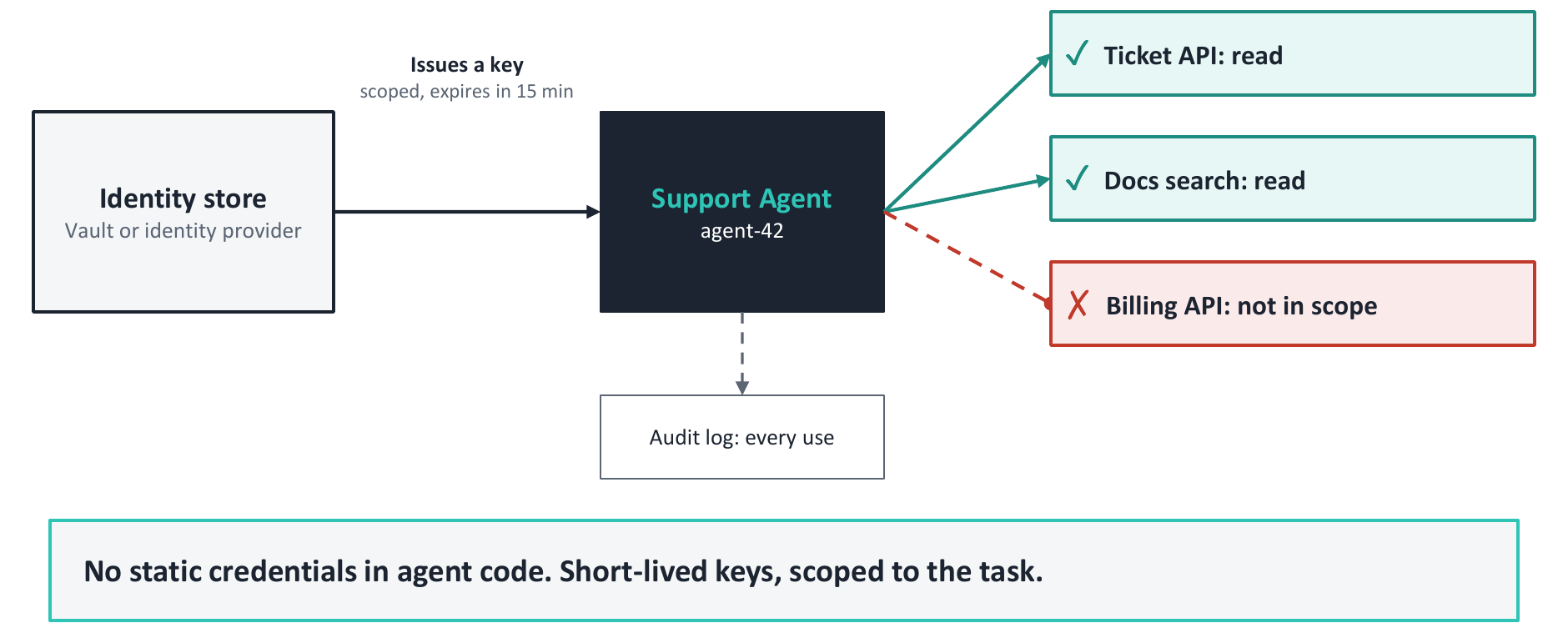
- Agent: Support Agent,
agent-42 - Key: scoped to the task, expires in 15 minutes (
TTL: 15 MIN | SCOPE: TICKET_API_READ) - Allowed: Ticket API (read), docs search (read)
- Not in scope: Billing API
- Audit log: every use is recorded
No static credentials in agent code. Short-lived keys, scoped to the task. If the agent is compromised, the attacker gets 15 minutes of read access to tickets, not your billing system.
Tools to evaluate: Astrix, Oasis Security, Entro, Linx Security, Microsoft Entra Agent ID and Microsoft Agent 365.
Zero Trust for agents
Zero Trust isn’t new, but it fits agents perfectly. Never trust by network location or by prior approval alone.
- Verify every tool call, data source and agent-to-agent request at the point of execution.
- Minimize privilege for every task, and assume the agent’s context is already compromised.
- Check at runtime: validate every request against identity, policy and context gates.
On the Zero Trust slide I added a line for the Istanbul audience: “Türk insanının güven sorunu değil, tecrübe fazlalığı var.” Roughly: Turkish people don’t have a trust problem, they have too much experience. That’s the right attitude for agents too.
Runtime gates: check every call
Here’s what that looks like when an agent tries to send an email to an external address:
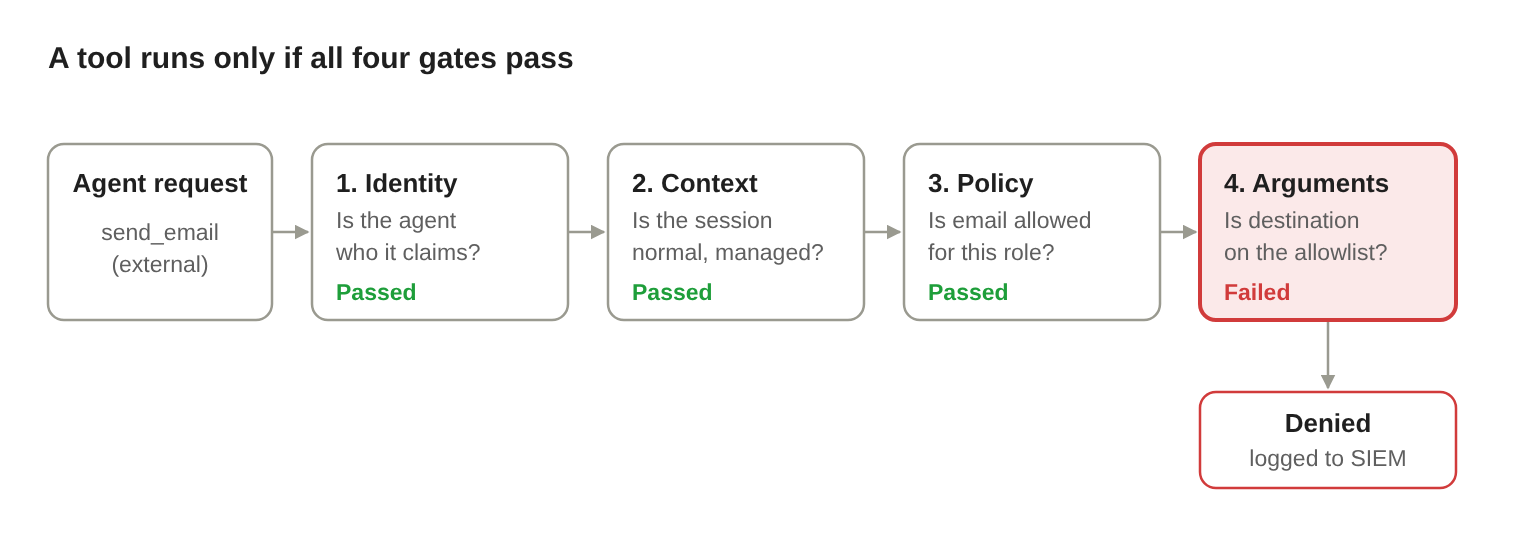
Three gates pass, but the destination isn’t on the allowlist, so the call is denied and the failure is logged to your SIEM. Past approval does not carry forward: every request is verified again at runtime.
Agent gateways: one choke point
If every team bolts its own checks onto every agent, you end up with inconsistent, half-enforced policy. An agent gateway centralizes it: a single choke point for tool access, policy and logging.
A gateway handles authentication, rate limits, allowlists and human approval for risky actions. Its core jobs are policy enforcement, observability, audit trails, safe orchestration and boundaries. The payoff is that every agent is governed the same way.
A gateway in action
Support agent agent-42 asks the gateway to send_file to an external address. The gateway checks identity, evaluates policy, applies guardrails, writes an audit log and emits observability data. Then it routes the request one of three ways:
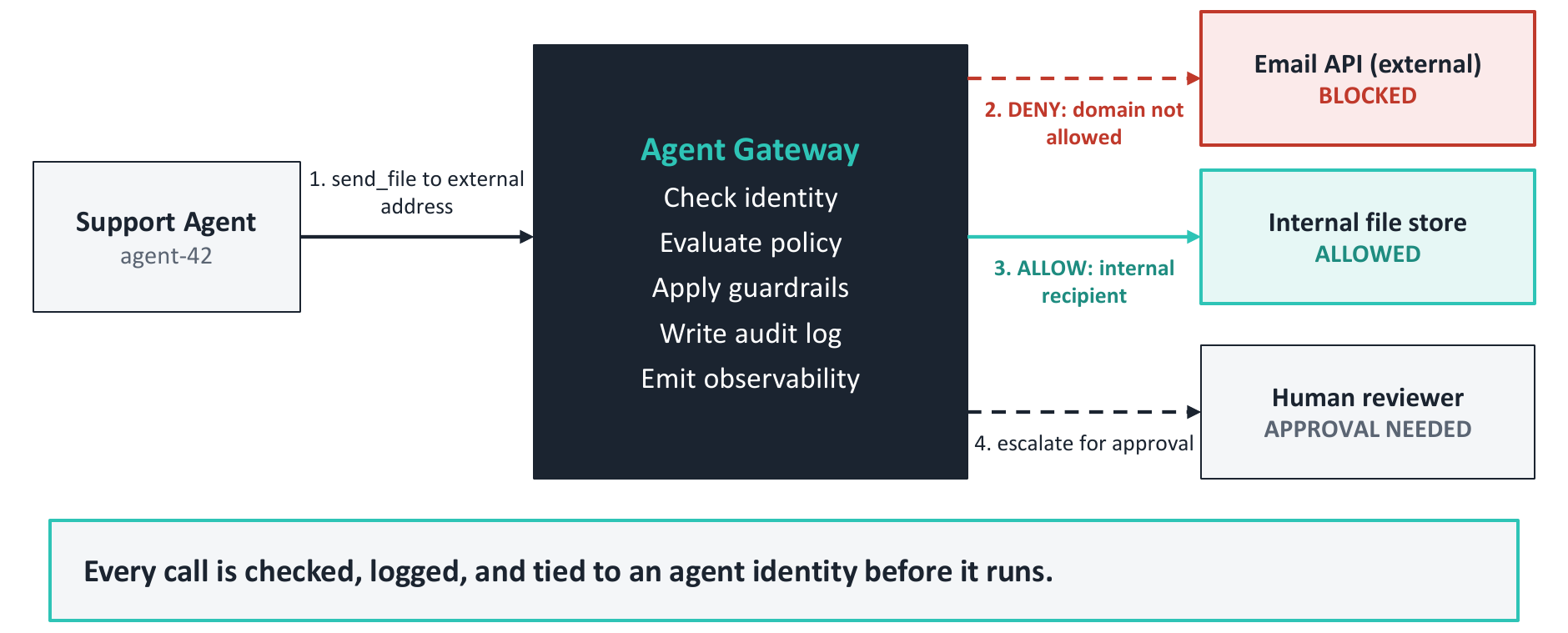
| Destination | Decision | Why |
|---|---|---|
| Email API (external) | Blocked | Domain not on the allowlist |
| Internal file store | Allowed | Internal recipient |
| Human reviewer | Approval needed | High-risk action escalated |
Every call is checked, logged and tied to an agent identity before it runs.
Options to look at: MCP gateways (Gravitee, TrueFoundry, Bifrost), Amazon Bedrock AgentCore Gateway with Policy, LangGraph human-in-the-loop and OpenAI Agents SDK guardrails.
Contain, detect, recover
Assume a boundary will be challenged, and plan how you’ll contain the consequences before it happens.
- Detect: alert on unusual destinations, odd access patterns and repeated denied calls. A string of denials is often the first sign of an injection in progress.
- Limit: enforce caps on actions, spending, execution time and sub-agents.
- Stop: keep an operator-controlled kill switch that revokes credentials and halts active, queued and delegated work.
- Preserve evidence: keep tamper-resistant logs, with secrets and sensitive data redacted.
- Own it: assign an incident owner and actually rehearse recovery. Remember the customer table with no backups.
Test the boundary, not just the answer
Most teams test whether the model says the right thing. That’s not enough. A refusal in the chat is not proof that no unauthorized action occurred.
- Test direct prompts and malicious content hidden in documents and tool responses.
- Assert that unauthorized tool calls and cross-user data access are actually blocked at the gateway.
- Test the failure modes: expired credentials, gateway bypass attempts, and an unavailable policy service. Does it fail closed?
- Repeat the tests after every model, prompt, tool or permission change.
- Measure both sides: blocked attacks and legitimate task completion. A policy that blocks everything is secure and useless.
The tool landscape: commercial and open source
Here’s the map I shared at the end of the talk, grouped by the layer each tool protects:
| Layer | Commercial | Open source |
|---|---|---|
| Prompt protection | Lakera Guard, Microsoft Prompt Shields, AWS Bedrock Guardrails | NVIDIA NeMo Guardrails, Guardrails AI |
| Data protection | Microsoft Purview, Google Cloud DLP | Microsoft Presidio |
| Identity | Astrix, Oasis Security, Entro, Linx Security, Microsoft Entra Agent ID | SPIFFE / SPIRE, OpenFGA |
| Agent gateway and policy | Microsoft Agent 365, AWS Bedrock AgentCore Gateway, Gravitee, TrueFoundry | Bifrost, Open Policy Agent (OPA), Cedar |
My advice is to mix both: open source for control you can inspect, commercial for support and scale.
Key takeaways
Prompt injection is only the beginning.
- Tool abuse is the real threat.
- Permission boundaries are mandatory.
- Agents must be governed as identities.
- Zero Trust applies to every tool call.
- Agent gateways are the future of AI security.
I closed the talk with one slide: a giant “LGTM” Don’t LGTM your agents. Put the boundaries in place, then verify every action.
Thanks to everyone who came to the session at DevNot, and to the organizers for having me.
Connect
- Download the slides please visit Download
- Blog: taswar.zeytinsoft.com
- LinkedIn: linkedin.com/in/taswarbhatti
- GitHub: github.com/taswar
- Free ebook: Prompt Engineering for .NET Developers, for .NET developers building real AI-powered apps in C#. No Python, no hype.

Leave A Comment