Picture a home design app. A customer types, “Show me a modern kitchen with dark cabinets and a large center island.” An image appears in seconds. They follow up: “Make it brighter, and add natural wood accents.” The app updates the image without redrawing the whole scene, without losing the layout that was already right. That’s the interaction GPT-image-2.5 — split into two models, Flare and Sunburst — is built for: fast, iterative image generation and editing that actually holds up across a real revision loop, not just a single lucky prompt.
I have a post covering GPT-Image-2 in case you missed it.
Both models are now Generally Available from OpenAI or most providers. As always: no Python, no notebooks. Just Azure.AI.OpenAI‘s ImageClient, Microsoft.Extensions.Configuration, and dotnet run.
What Actually Shipped
- Two models, one job split by speed vs. precision. Flare is the smaller, faster model for most production workloads — higher-quality images than GPT-image-2 at 50% lower latency, which is what keeps a user inside a live iteration loop instead of waiting on every change. Sunburst is for creative workflows that need greater precision and control — high-fidelity campaign assets and polished visuals where quality outranks speed.
- More accurate editing. Update targeted elements while preserving the rest of the image — not a full re-roll every time you ask for a small change.
- Stronger multi-turn editing. Refine through successive instructions without the image drifting or degrading as edits accumulate. This is the thing that actually breaks in a lot of image models: edit three quietly changes something edit one got right.
- Better instruction following. More accurate interpretation of complex visual instructions, layouts, and stylistic direction.
- Transparent background generation. Generate logos, product cutouts, UI assets, icons, and stickers directly with a transparent background — set background=”transparent” and output_format=”png” (PNG or WebP required; JPEG doesn’t support transparency).
- Both GA, both production-ready. Unlike some of the other models in this catalog, there’s no preview caveat here — Flare and Sunburst are both fully supported for production workloads today.
Why This Matters for .NET Developers Specifically
The use cases map directly onto real .NET workloads:
- Marketing and campaign production — generate and resize campaign assets from an approved creative direction, with legible headline text rendered directly in the image
- Retail and e-commerce catalogs — produce and maintain large volumes of consistent product imagery at scale
- Virtual try-on and personalization — let a shopper preview an item, then adjust color, style, or setting through successive edits without the result drifting
- Education and training content — generate diagrams and illustrations that evolve as a lesson or explanation develops
- Travel, real estate, and discovery apps — turn a description into personalized imagery a user can react to and refine
Both models sit behind the exact same ImageClient you may already be using for GPT-image-2 or GPT-image-1 — swapping in Flare or Sunburst is a deployment-name change, not a rewrite.
Getting Started
|
1 2 3 4 5 6 7 8 9 |
dotnet new console -n GptImage2.5-flare-sunburst-demo cd GptImage2.5-flare-sunburst-demo dotnet add package Azure.AI.OpenAI dotnet add package Azure.Identity dotnet add package Microsoft.Extensions.Configuration.UserSecrets dotnet add package Microsoft.Extensions.Configuration.EnvironmentVariables dotnet user-secrets init dotnet user-secrets set “AZURE_AI_ENDPOINT” “https://your-resource.services.ai.azure.com”‘ dotnet user-secrets set “AZURE_AI_API_KEY” “<your-resource-api-key>” |
Deploy gpt-image-2.5-flare and gpt-image-2.5-sunburst from the Foundry Model Catalog to your project — same process as any other model. Grab your endpoint, and you’re ready to go.
Here’s the shared client setup every example below builds on:
|
1 2 3 4 5 6 7 8 9 10 11 12 13 14 15 16 17 18 19 20 21 22 23 24 25 26 27 28 29 30 31 32 33 |
using Azure.AI.OpenAI; using System.ClientModel; using Microsoft.Extensions.Configuration; using OpenAI.Images; using System.Net.Http.Headers; using System.Text.Json; var config = new ConfigurationBuilder() .AddUserSecrets<Program>() .AddEnvironmentVariables() .Build(); var endpoint = new Uri(config[“AZURE_AI_ENDPOINT”] ?? throw new InvalidOperationException( “AZURE_AI_ENDPOINT is not set. Run: dotnet user-secrets set \”AZURE_AI_ENDPOINT\” \”<your-endpoint>\””)); // After reading endpoint from configuration: var apiKey = config[“AZURE_AI_API_KEY”] ?? throw new InvalidOperationException(“AZURE_AI_API_KEY is not set.”); var imageEditApiVersion = config[“AZURE_AI_IMAGE_EDIT_API_VERSION”] ?? “2025-04-01-preview”; const string flareDeployment = “gpt-image-2.5-flare”; const string sunburstDeployment = “gpt-image-2.5-sunburst”; var azureClient = new AzureOpenAIClient(endpoint, new ApiKeyCredential(apiKey)); var flareClient = azureClient.GetImageClient(flareDeployment); var sunburstClient = azureClient.GetImageClient(sunburstDeployment); using var httpClient = new HttpClient(); httpClient.DefaultRequestHeaders.Add(“api-key”, apiKey); Uri CreateImageRequestUri(string deployment, string operation, string apiVersion) => new( $“{endpoint.ToString().TrimEnd(‘/’)}/openai/deployments/{Uri.EscapeDataString(deployment)}/images/{operation}?api-version={Uri.EscapeDataString(apiVersion)}”); |
Now let’s put both models to work on the scenarios that we are targeting.
Use Case 1: Home Design — Iterative Generation That Holds Its Shape
The scenario from the announcement, minus the voice layer: a customer describes a kitchen, sees it rendered, and asks for a change — and the change should read as a revision, not a brand-new image that happens to share a theme. Flare is the right choice here since this is a live iteration loop where responsiveness matters more than maximum fidelity.
|
1 2 3 4 5 6 7 8 9 10 11 12 13 14 15 16 17 18 19 20 21 22 23 24 25 26 27 28 29 30 31 32 33 34 35 36 37 38 39 40 41 42 43 44 45 46 47 48 49 50 51 52 53 54 55 56 57 58 59 60 61 62 63 64 |
async Task<byte[]> ReadImageResponseAsync(HttpResponseMessage response, Uri requestUri) { var responseBody = await response.Content.ReadAsStringAsync(); if (!response.IsSuccessStatusCode) { throw new HttpRequestException( $“Azure image request failed with HTTP {(int)response.StatusCode} ({response.ReasonPhrase}). “ + $“Endpoint: {requestUri}\nResponse: {responseBody}”); } using var json = JsonDocument.Parse(responseBody); var base64Image = json.RootElement .GetProperty(“data”)[0] .GetProperty(“b64_json”) .GetString(); if (string.IsNullOrWhiteSpace(base64Image)) { throw new InvalidOperationException(“Azure image response did not contain data[0].b64_json.”); } return Convert.FromBase64String(base64Image); } async Task<byte[]> GenerateKitchenDesignAsync(string description) { GeneratedImage image = await flareClient.GenerateImageAsync(description, new ImageGenerationOptions { Size = new GeneratedImageSize(1536, 864) }); return image.ImageBytes.ToArray(); } async Task<byte[]> ReviseKitchenDesignAsync(byte[] currentImage, string revisionInstruction) { var requestUri = CreateImageRequestUri(flareDeployment, “edits”, imageEditApiVersion); using var form = new MultipartFormDataContent(); using var imageContent = new ByteArrayContent(currentImage); imageContent.Headers.ContentType = new MediaTypeHeaderValue(“image/png”); form.Add(imageContent, “image[]”, “kitchen-design.png”); form.Add(new StringContent(revisionInstruction), “prompt”); form.Add(new StringContent(“1536×864”), “size”); using var response = await httpClient.PostAsync(requestUri, form); return await ReadImageResponseAsync(response, requestUri); } Console.WriteLine(“**************************** Case 1 ************************************”); Console.WriteLine(“**** Home Design — Iterative Generation That Holds Its Shape ***********”); // First pass: the initial description. byte[] kitchenV1 = await GenerateKitchenDesignAsync( “A modern kitchen with dark cabinets and a large center island, professional “ + “interior photography style, natural daylight.”); await File.WriteAllBytesAsync(“kitchen-v1.png”, kitchenV1); Console.WriteLine(“Saved: kitchen-v1.png”); // Second pass: an edit against the same image, not a fresh prompt from scratch. byte[] kitchenV2 = await ReviseKitchenDesignAsync(kitchenV1, “Make the lighting brighter and add natural wood accents to the cabinetry and “ + “island. Keep the layout, camera angle, and overall composition the same.”); await File.WriteAllBytesAsync(“kitchen-v2.png”, kitchenV2); Console.WriteLine(“Saved: kitchen-v2.png”); Console.WriteLine(“**************************** END Case 1 **********************************”); |
Expected Output
|
1 2 |
Saved: kitchen–v1.png Saved: kitchen–v2.png |


The important detail is which API call each step uses: the first pass is a plain generation, but the revision is an edit against the actual first image — not a second generation call with an updated prompt. That distinction is what keeps the island and the camera angle consistent between v1 and v2 instead of getting a completely different kitchen that happens to also have wood accents.
Use Case 2: Travel Planning — Exploration with Flare, Final Asset with Sunburst
Exploring destinations and itineraries generates a lot of throwaway previews for every one image a traveler actually keeps. This is the two-tier pattern the Flare/Sunburst split is built for: cheap, fast previews during exploration, then a single higher-fidelity render once a direction is locked.
|
1 2 3 4 5 6 7 8 9 10 11 12 13 14 15 16 17 18 19 20 21 22 23 24 25 26 27 28 29 30 31 32 33 34 35 36 37 38 39 40 41 42 43 |
async Task<byte[]> PreviewDestinationAsync(string description) { GeneratedImage preview = await flareClient.GenerateImageAsync(description, new ImageGenerationOptions { Size = GeneratedImageSize.W1024xH1024, }); return preview.ImageBytes.ToArray(); } async Task<byte[]> FinalizeItineraryImageAsync(string description) { GeneratedImage final = await sunburstClient.GenerateImageAsync(description, new ImageGenerationOptions { Size = new GeneratedImageSize(1536, 864) }); return final.ImageBytes.ToArray(); } Console.WriteLine(“**************************** Case 2 ************************************”); Console.WriteLine(“**** Travel Planning — Exploration with Flare, Final Asset with Sunburst *****”); // Exploration phase: quick, cheap previews as the traveler narrows down ideas. string[] explorationPrompts = [ “A quiet coastal town in Portugal, whitewashed buildings, golden hour, travel photography style.”, “Same coastal town, but with a small boat harbor visible and outdoor cafes along the water.”, ]; foreach (var prompt in explorationPrompts) { byte[] preview = await PreviewDestinationAsync(prompt); await File.WriteAllBytesAsync($“preview-{explorationPrompts.ToList().IndexOf(prompt)}.png”, preview); } Console.WriteLine(“Traveler picked the second preview – finalizing the itinerary card for day 3.”); byte[] finalCard = await FinalizeItineraryImageAsync( “A polished travel itinerary hero image: a coastal Portuguese town with a small boat harbor, “ + “outdoor cafes, golden hour lighting, labeled ‘Day 3: Coastal Harbor Town’, clean readable text overlay.”); await File.WriteAllBytesAsync(“itinerary-day3-final.png”, finalCard); Console.WriteLine(“Saved: itinerary-day3-final.png”); Console.WriteLine(“**************************** END Case 2 **********************************”); |
Expected Output
|
1 2 |
Traveler picked the second preview – finalizing the itinerary card for day 3. Saved: itinerary–day3–final.png |

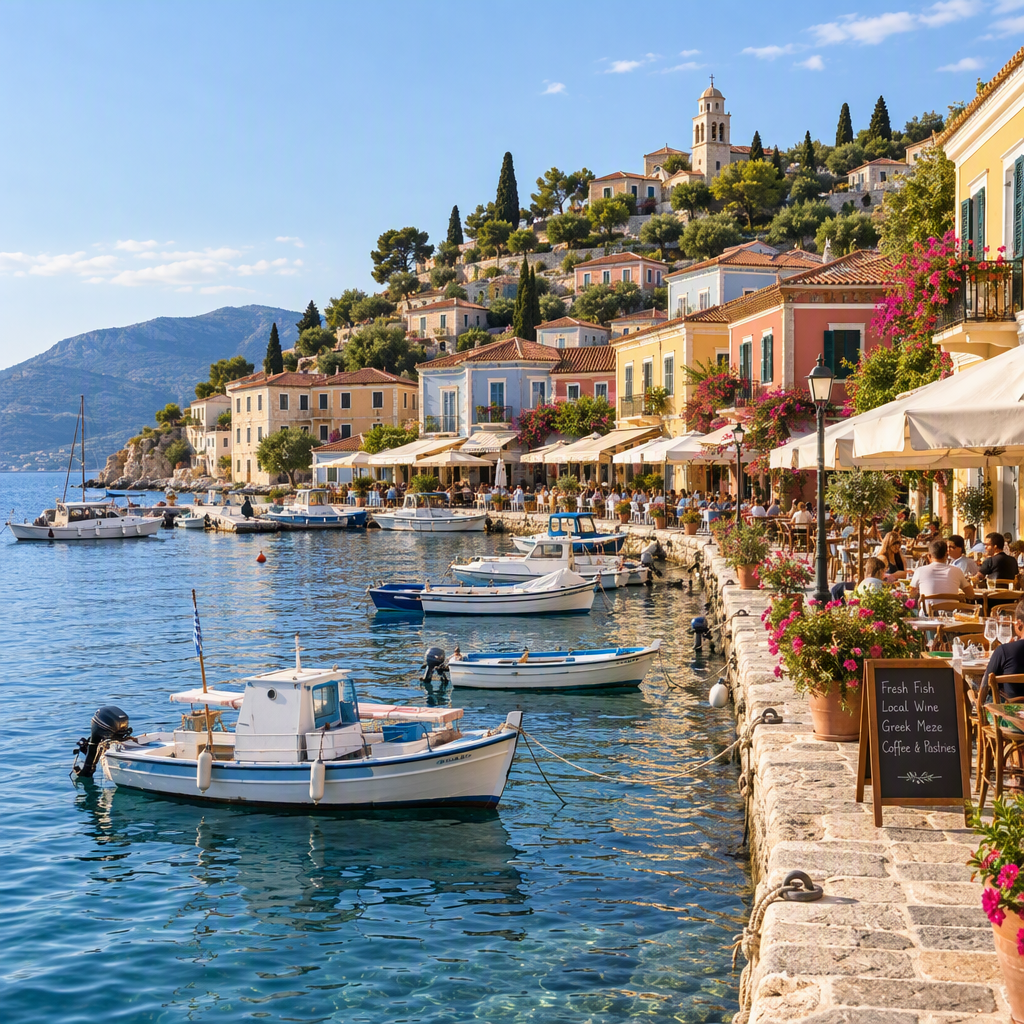
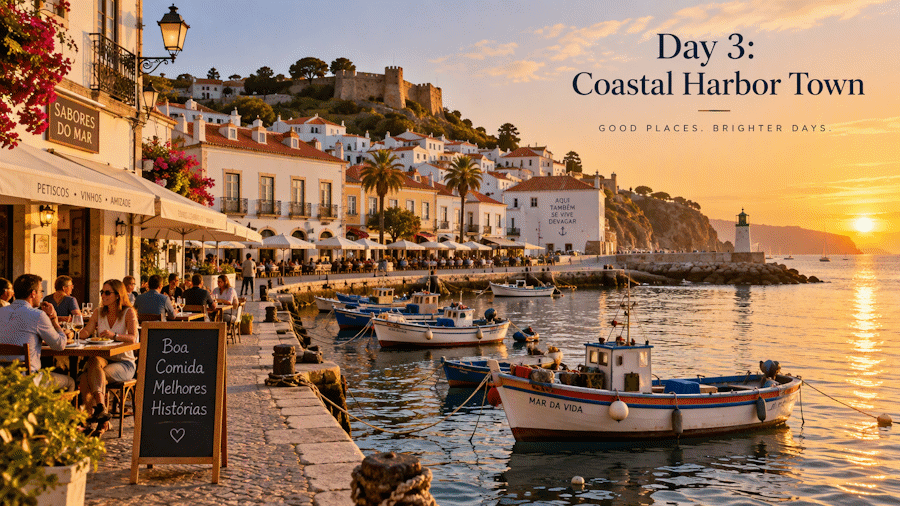
Paying full Sunburst price for every exploratory preview doesn’t make sense when most of them get discarded — this pattern only spends the higher-cost, higher-fidelity call once a customer has actually committed to a direction.
Use Case 3: Education — Diagrams That Evolve With the Lesson
A student discusses a concept with an AI tutor and gets diagrams that evolve as the lesson progresses — not one static diagram handed over up front. Flare regenerates a diagram each time the topic shifts, which only works if generation is fast enough to keep pace with a real conversation.
|
1 2 3 4 5 6 7 8 9 10 11 12 13 14 15 16 17 18 19 20 21 22 23 24 25 26 27 28 29 30 31 32 33 |
async Task<byte[]> GenerateLessonDiagramAsync(string concept) { var prompt = $“”“ A clean, labeled educational diagram explaining: {concept}. Simple flat illustration style, high contrast, readable labels, suitable for a student-facing tutoring app. ““”; GeneratedImage diagram = await flareClient.GenerateImageAsync(prompt, new ImageGenerationOptions { Size = new GeneratedImageSize(1024, 1024) }); return diagram.ImageBytes.ToArray(); } // Simulated turns of a tutoring conversation – each turn shifts what the diagram needs to show. var lessonTurns = new[] { “how photosynthesis converts sunlight into energy in a plant cell”, “how photosynthesis differs between C3 and C4 plants”, }; Console.WriteLine(“**************************** Case 3 ************************************”); Console.WriteLine(“**** Education — Diagrams That Evolve With the Lesson ******************”); foreach (var concept in lessonTurns) { byte[] diagram = await GenerateLessonDiagramAsync(concept); string fileName = $“lesson-diagram-{lessonTurns.ToList().IndexOf(concept)}.png”; await File.WriteAllBytesAsync(fileName, diagram); Console.WriteLine($“Saved: {fileName} (\”{concept}\”)”); } Console.WriteLine(“**************************** END Case 3 **********************************”); |
Expected Output
|
1 2 |
Saved: lesson–diagram–0.png (“how photosynthesis converts sunlight into energy in a plant cell”) Saved: lesson–diagram–1.png (“how photosynthesis differs between C3 and C4 plants”) |
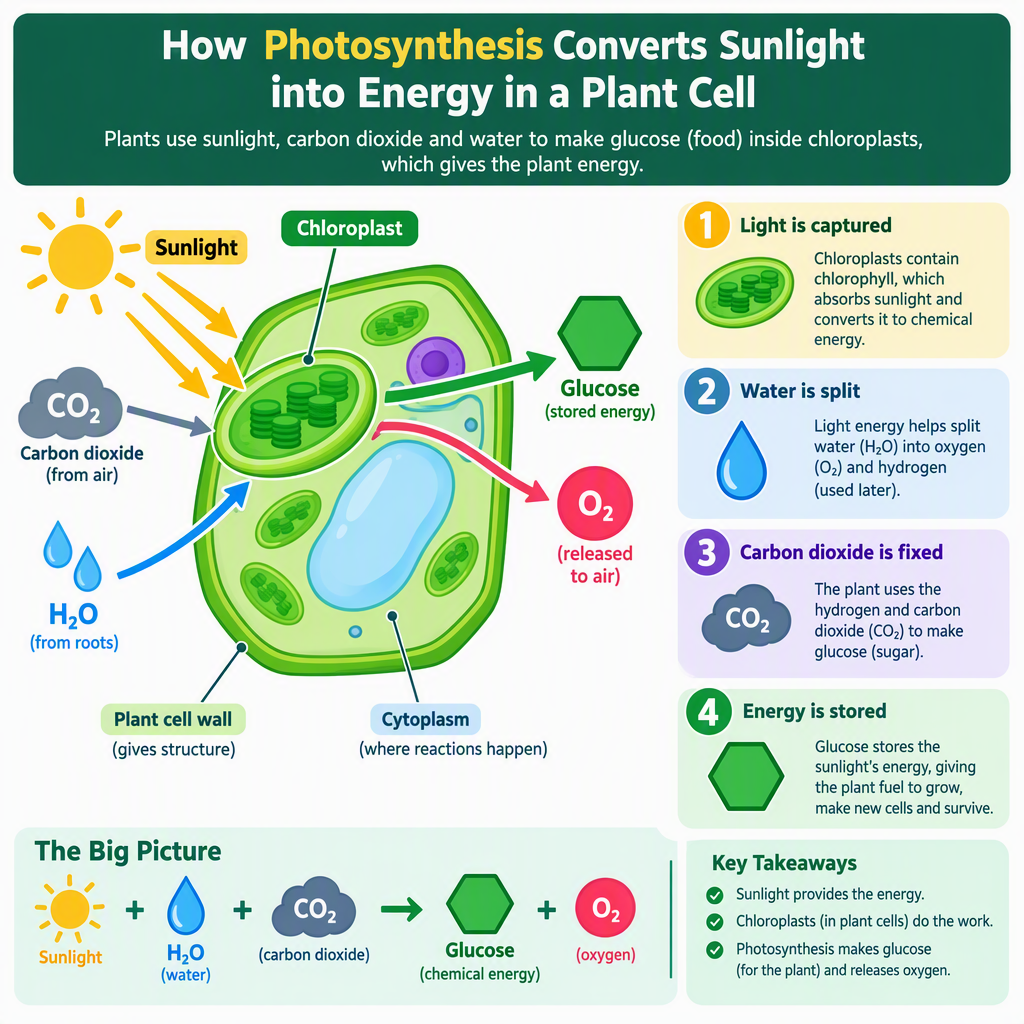
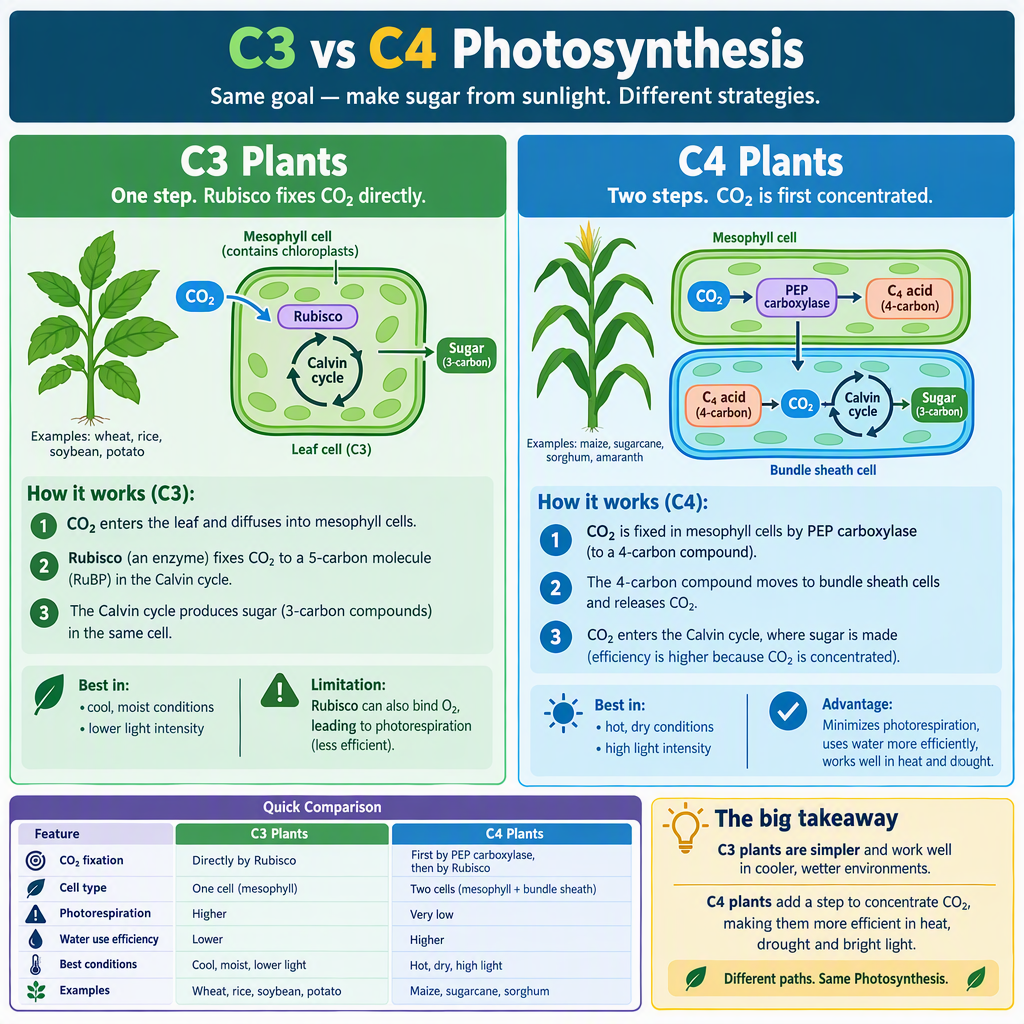
Wire this into a chat-driven tutoring UI and the diagram updates the moment a student asks a follow-up question — no separate “generate a diagram” button, no need for the student to describe what they want drawn in prompt-engineering terms.
Use Case 4: Retail Campaign Creative — Legible Text, Consistent Batches
Marketing and catalog work both come down to the same requirement: consistent output at volume, with headline text that’s actually legible — historically the weak point of diffusion models. Here’s a campaign banner from Sunburst (final quality matters) followed by a Flare batch of product catalog shots (volume matters more than maximum fidelity).
|
1 2 3 4 5 6 7 8 9 10 11 12 13 14 15 16 17 18 19 20 21 22 23 24 25 26 27 28 29 30 31 32 33 34 35 36 37 38 39 40 41 42 43 44 45 |
// Final campaign asset – precision and legible text matter more than speed here. var campaignPrompt = “”“ A wide-format e-commerce banner ad for a summer sale. Clean minimalist studio background in soft pastel blue. A pair of white running shoes floating at a slight angle, dramatic soft shadow beneath. Bold, perfectly legible headline text at the top reading “SUMMER SALE – 30% OFF” in a clean modern sans-serif font, white text with subtle drop shadow. ““”; Console.WriteLine(“**************************** Case 4 ************************************”); Console.WriteLine(“**** Retail Campaign Creative — Legible Text, Consistent Batches *******”); GeneratedImage campaignAsset = await sunburstClient.GenerateImageAsync(campaignPrompt, new ImageGenerationOptions { Size = new GeneratedImageSize(1536, 864) }); await File.WriteAllBytesAsync(“campaign-summer-sale-banner.png”, campaignAsset.ImageBytes.ToArray()); Console.WriteLine(“Saved: campaign-summer-sale-banner.png”); // Catalog batch – volume matters, Flare keeps cost and latency down across many SKUs. var catalogItems = new[] { new { Sku = “SKU-1001”, Description = “a matte black ceramic coffee mug” }, new { Sku = “SKU-1002”, Description = “a glossy red ceramic coffee mug” }, new { Sku = “SKU-1003”, Description = “a sage green ceramic coffee mug” }, }; const string catalogStyleTemplate = “”“ A studio product photo of {0} on a plain white seamless background, soft even lighting from the upper left, subtle reflection beneath, centered composition, e-commerce catalog style, no props, no text. ““”; foreach (var item in catalogItems) { var prompt = string.Format(catalogStyleTemplate, item.Description); GeneratedImage image = await flareClient.GenerateImageAsync(prompt, new ImageGenerationOptions { Size = new GeneratedImageSize(1024, 1024) }); string outPath = $“catalog-{item.Sku}.png”; await File.WriteAllBytesAsync(outPath, image.ImageBytes.ToArray()); Console.WriteLine($“Saved: {outPath}”); } Console.WriteLine(“**************************** END Case 4 **********************************”); |
Expected Output
|
1 2 3 4 |
Saved: campaign–summer–sale–banner.png Saved: catalog–SKU–1001.png Saved: catalog–SKU–1002.png Saved: catalog–SKU–1003.png |




Open the campaign banner and check the headline text specifically — that’s the failure mode this model generation is explicitly built to fix. And because the catalog template is fixed with only the description swapped per SKU, lighting and framing stay consistent across the whole batch — swap the hardcoded array for a real product database and this loop becomes an overnight catalog-refresh job.
Use Case 5: Virtual Try-On — Multi-Turn Editing Without Drift
Virtual try-on lets a shopper preview an item and then adjust color, style, or setting — successive edits that need to stay consistent with each other, not drift with every change. This is Sunburst’s precision-editing strength: each edit builds on the last while the customer’s pose, framing, and identity stay intact.
|
1 2 3 4 5 6 7 8 9 10 11 12 13 14 15 16 17 18 19 20 21 22 23 24 25 26 27 28 29 30 31 32 33 |
Console.WriteLine(“**************************** Case 5 ************************************”); Console.WriteLine(“******** Virtual Try-On — Multi-Turn Editing Without Drift *************”); async Task<byte[]> EditProductPhotoAsync(byte[] sourceImage, string editInstruction) { var requestUri = CreateImageRequestUri(sunburstDeployment, “edits”, imageEditApiVersion); using var form = new MultipartFormDataContent(); using var imageContent = new ByteArrayContent(sourceImage); imageContent.Headers.ContentType = new MediaTypeHeaderValue(“image/png”); form.Add(imageContent, “image[]”, “product-photo.png”); form.Add(new StringContent(editInstruction), “prompt”); form.Add(new StringContent(“1024×1024”), “size”); using var response = await httpClient.PostAsync(requestUri, form); return await ReadImageResponseAsync(response, requestUri); } byte[] originalPhoto = await File.ReadAllBytesAsync(“customer-tryon-photo.png”); // Successive edits – each one builds on the last, and Sunburst is built to keep // the customer’s pose, framing, and identity consistent across all of them. byte[] navyJacket = await EditProductPhotoAsync(originalPhoto, “Replace the jacket the person is wearing with a navy blue version of the same jacket style. “ + “Keep the person’s pose, face, and background exactly the same.”); await File.WriteAllBytesAsync(“tryon-navy.png”, navyJacket); byte[] navyJacketOutdoors = await EditProductPhotoAsync(navyJacket, “Change the background to an outdoor city street setting. Keep the jacket color and the “ + “person’s pose and appearance exactly the same.”); await File.WriteAllBytesAsync(“tryon-navy-outdoors.png”, navyJacketOutdoors); Console.WriteLine(“Saved: tryon-navy.png, tryon-navy-outdoors.png”); Console.WriteLine(“**************************** END Case 5 **********************************”); |
Expected Output
|
1 |
Saved: tryon–navy.png, tryon–navy–outdoors.png |
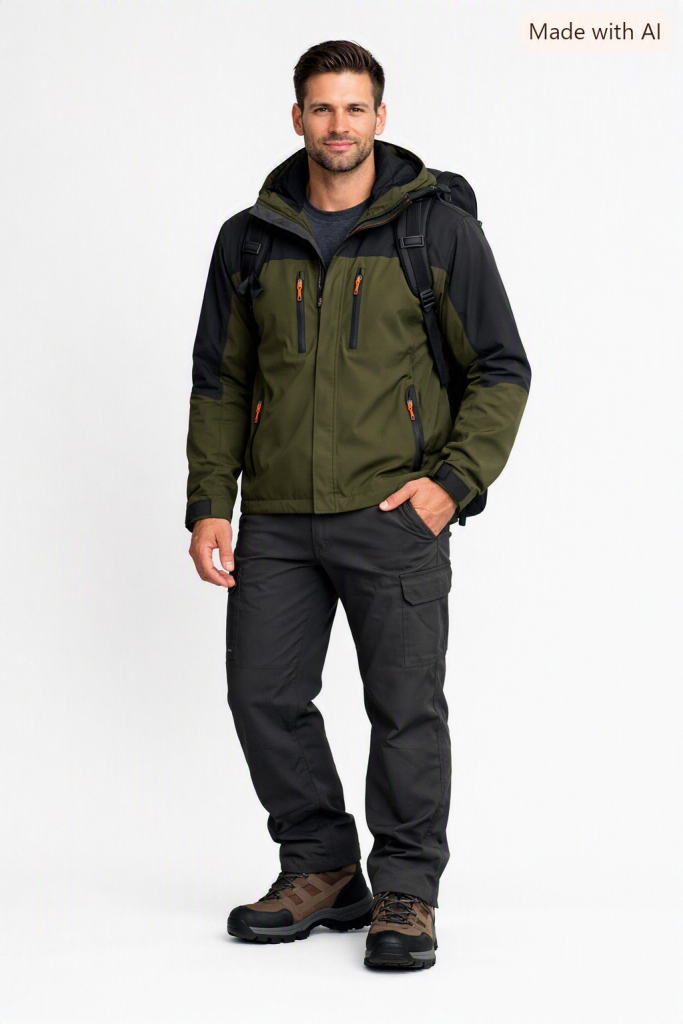


Two edits deep, the customer’s face, pose, and the jacket’s shape are all still consistent — only the color and background changed, exactly as requested. That’s “stronger multi-turn editing” in practice: the kind of drift where edit three quietly changes something from edit one is exactly what this release is built to avoid, and it’s the difference between a try-on feature customers trust and one they give up on after two tries.
Where This Fits (and Where It Doesn’t)
Reach for Flare when:
- You’re iterating live with a user in the loop and latency matters more than maximum fidelity
- You’re generating at volume — catalogs, previews, personalization
Reach for Sunburst when:
- The output is a final, ship-ready asset — a campaign hero image, a locked try-on result
- Editing precision matters more than speed, especially across multiple successive edits
Don’t reach for either when:
- You need pixel-perfect brand-guideline compliance with zero human review — treat generated output as a strong first draft, not an approval-free final asset
- Your workload depends on non-text modalities or file attachments the image APIs don’t cover — check current capability docs before committing to a design
Wrapping Up
The pitch for GPT-image-2.5 isn’t “one bigger image model” — it’s a genuine two-tier portfolio: iterate fast with Flare, ship precise with Sunburst, and trust that a multi-turn edit chain won’t quietly drift by the third revision. For .NET developers, both models sit behind the exact same ImageClient you already know from GPT-image-2 — the new surface area is picking which model fits which step of your workflow, not learning a new SDK. Note: I had issues with the edit calls returing 404, thus I switched to HTTP Client
Source code: https://github.com/taswar/GptImage2.5-flare-sunburst-demo
Building AI features in C#? I write about practical, no-hype prompt engineering and Azure AI patterns for .NET developers. Check out Prompt Engineering for .NET Developers — free, no Python required. Also subscribe to my mailing list for the latest blogs, tips and tricks I share.

Leave a Reply