
Visual Studio 2013 provides Task Runner Explorer for us to run Grunt & Gulp task right inside of Visual Studio.
One can download Task Runner Explorer from Visual Studio Gallery
Once installed we can now use npm to install grunt for us in our node web project.
|
1 2 3 4 5 6 |
npm install grunt —save–dev //the command above will install into our package.json file “devDependencies”: { “grunt”: “^0.4.5” } |
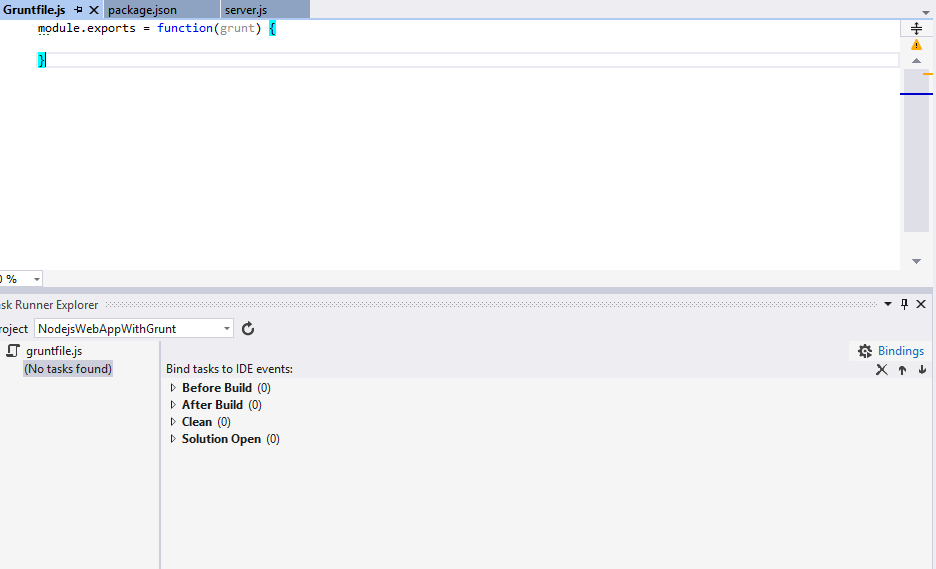
We now will create a new Gruntfile.js and also launch our task runner explorer (View > Other Windows > Task Runner Explorer), as you can see we don’t have any task yet so there is no task to run.
We will now add our hello world task
|
1 2 3 4 5 |
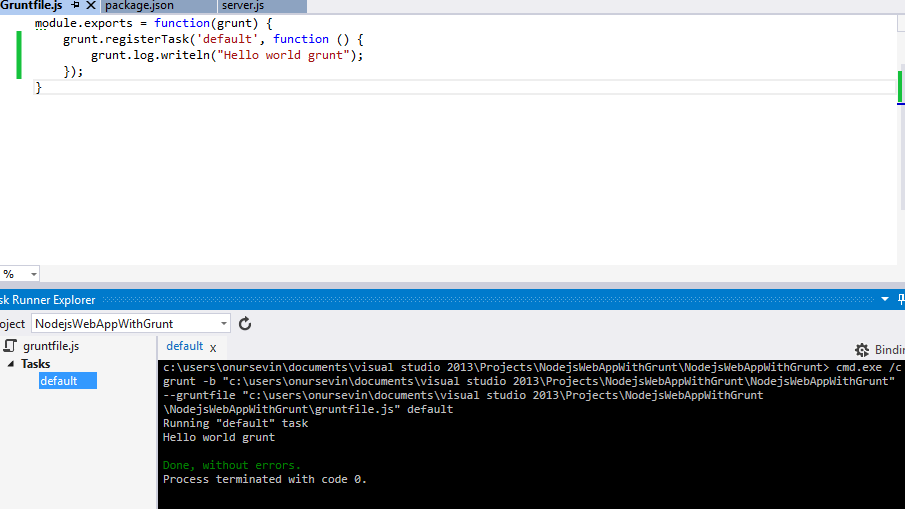
module.exports = function(grunt) { grunt.registerTask(‘default’, function () { grunt.log.writeln(“Hello world grunt”); }); } |
From there we will need to click on the reload button on task runner and it will now contain our default task.
Lets try to run the default task and see how it looks like
In my next blog post I will show how we will use Grunt to concat (join) some files together and continue on our journey with Task Runner Explorer in Visual Studio 2013.

Leave a Reply