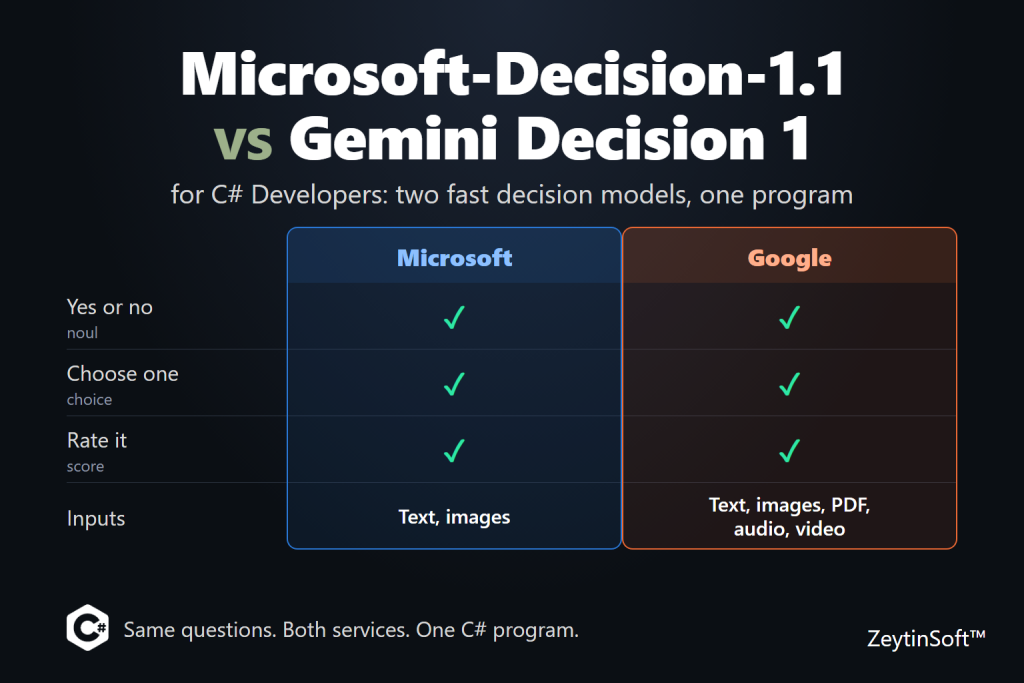
In October I wrote about Microsoft-Decision-1: a model that doesn’t write anything. You give it some input and a closed set of questions, and it hands back probabilities your code can act on. Since then, Microsoft’s Decision-1.1 became generally available on November 17, 2026, and Google has shipped the same idea as the Gemini Decisions API.
The two are built on the same pattern, which makes them easy to compare. This post puts them side by side from C#: what each one takes, what each one costs, and a small .NET 11 program that sends the same questions to both, so you can read the latency, the probabilities and the token counts yourself. No Python required. Both services are plain HTTP, so HttpClient is enough.
The idea in a minute
Both services work the same way. You send some input and one or more questions. Each question is one of three types:
- Yes or no (noul): is this invoice missing a purchase order number?
- Choose one (choice): which team should get this ticket?
- Rate it (score): how severe is this, on an ordered scale?
The answer is a probability, a chosen label with a probability for every option, or a position on your scale. There is no written rationale. Your code decides what to do with the numbers: route, gate, rank or escalate. Neither service bills output tokens, because there are none.
If a model has to write the answer, use a chat model. If your code needs a branch, these are the cheaper, faster tool. OpenAI has its own version on GPT-6 Luna, which I cover in a separate post and in Chapter 6 of my free ebook. This post sticks to Microsoft and Google.
Side by side
| Microsoft-Decision-1.1 | Gemini Decision 1 | |
|---|---|---|
| Status | Generally available since November 17, 2026 | gemini-decision-1 on the Gemini Developer API, v1beta |
| Inputs | Text and images | Text, images, PDF documents, audio and video |
| Endpoint | {resource}/providers/microsoft/v1/systemone | POST https://generativelanguage.googleapis.com/v1beta/decisions |
| Sign-in | Microsoft Entra ID, or an API key in the api-key header | An API key in the x-goog-api-key header |
| Question types | noul, choice, score | noul, choice, score |
| Yes/no criteria | true and false | true_description and false_description |
| Extra in the answer | Probabilities. A confidence value also came back on choice and score answers in my run, though the Learn page doesn’t document it | Probabilities, plus a confidence value on every answer |
| Limits | Not stated on the Microsoft Learn page | 1 to 1,000 questions per request, 262,144-token context |
| Price (input) | $0.042 per 1M tokens, Global Standard, output not billed | $0.10 per 1M tokens, output not billed, free tier in AI Studio |
| Where it runs | Foundry deployments: Global Standard or Data Zone Standard | Gemini Developer API. The page doesn’t say where data is processed |
A few notes on that table:
- Inputs are the big difference. On Microsoft’s side, the Learn page documents images, and a third-party test found PNG and JPEG accepted, while PDF, audio and video returned HTTP 400. Google’s page lists documents, audio and video as input types, so “does this PDF invoice have a PO number?” or “does this call include consent?” is one request.
- Prices come from different places. The $0.042 figure is from OpenRouter and the Classmethod test, and Microsoft’s announcement says 1.1 costs the same as 1.0 without giving a number. Google’s $0.10 and its free tier come from its announcement. Check both pricing pages. Google also says a file shared across several questions is billed once per request.
- Speed claims are vendor claims. Google says 150 to 250 ms end to end. Microsoft says 1.1 is “more than twice as fast” as 1.0, with no number. The one independent test I found measured a median of about a second from Japan to a US East resource for Microsoft, network included, and saw no clear speed gain over 1.0. Run both from your own machine.
- Quality scores are close. Microsoft reports 68 for 1.1 on Artificial Analysis’s Decision Index v2.1, and Artificial Analysis lists Gemini Decision 1 at 66. The 68 is Microsoft’s own figure. A two-point gap on someone else’s tasks tells you little about yours.
- Google’s preview limits: the page lists no context caching or batch mode for the Decisions API, repeated input counts in full each time, and safety blocks come back as HTTP 400.
The .NET setup
|
1 2 3 4 5 6 7 8 9 |
dotnet new console -n Decision-1-1-vs-Gemini-Decision-1-CSharp-Sample cd Decision-1-1-vs-Gemini-Decision-1-CSharp-Sample dotnet add package Azure.Identity —version 1.21.0 dotnet add package Microsoft.Extensions.Configuration.UserSecrets —version 11.0.0 dotnet add package Microsoft.Extensions.Configuration.EnvironmentVariables —version 11.0.0 dotnet user-secrets init dotnet user-secrets set “AZURE_AI_ENDPOINT” “https://your-resource.services.ai.azure.com” dotnet user-secrets set “AZURE_AI_DEPLOYMENT” “ms-decision-1.1” dotnet user-secrets set “GEMINI_API_KEY” “your-gemini-key” |
You need the .NET 11 SDK. The code also builds on .NET 10 if you set net10.0 as the target framework and use the 10.0 versions of the two configuration packages. For Microsoft, deploy Microsoft-Decision-1.1 from the Foundry catalog. The request’s model field is your deployment name, not the model name. The program signs in with Entra ID through DefaultAzureCredential, so run az login and give your account the right role on the resource. To use an API key instead, set AZURE_AI_API_KEY as a user secret and skip az login. For Google, create a key in AI Studio. Put checkout-error.png and invoice.pdf from the sample repo next to Program.cs. RUNS (default 5) sets how many times each question set is sent to each service.
One program, two services
The full project is on GitHub: Decision-1-1-vs-Gemini-Decision-1-CSharp-Sample. The program defines each question once, in a neutral form, and each client maps it to its own JSON. It sends three cases to both services:
- A text ticket. A choice, a score and a yes/no, the same questions as my first post.
- A screenshot. A checkout page with a declined-card error, plus a yes/no and a choice.
- A PDF invoice. Two yes/no questions. Gemini takes it. For Microsoft the program prints “not supported”, because the documented input is images.
|
1 2 3 4 5 6 7 8 9 10 11 12 13 14 15 16 17 18 19 20 21 22 23 24 25 26 27 28 29 30 31 32 33 34 35 36 37 38 39 40 41 42 43 44 45 46 47 48 49 50 51 52 53 54 55 56 57 58 59 60 61 62 63 64 65 66 67 68 69 70 71 72 73 74 75 76 77 78 79 80 81 82 83 84 85 86 87 88 89 90 91 92 93 94 95 96 97 98 99 100 101 102 103 104 105 106 107 108 109 110 111 112 113 114 115 116 117 118 119 120 121 122 123 124 125 126 127 128 129 130 131 132 133 134 135 136 137 138 139 140 141 142 143 144 145 146 147 148 149 150 151 152 153 154 155 156 157 158 159 160 161 162 163 164 165 166 167 168 169 170 171 172 173 174 175 176 177 178 179 180 181 182 183 184 185 186 187 188 189 190 191 192 193 194 195 196 197 198 199 200 201 202 203 204 205 206 207 208 209 210 211 212 213 214 215 216 217 218 219 220 221 222 223 224 225 226 227 228 229 230 231 232 233 234 235 236 237 238 239 240 241 242 243 244 245 246 247 248 249 250 251 252 253 254 255 256 257 258 259 260 261 262 263 264 265 266 267 268 269 270 271 272 273 274 275 276 277 278 279 280 281 282 283 284 285 286 287 288 289 290 291 292 293 294 295 296 297 298 299 300 301 302 303 304 305 306 307 308 309 310 311 312 313 314 315 316 |
using System.Diagnostics; using System.Net.Http.Headers; using System.Text; using System.Text.Json; using Azure.Core; using Azure.Identity; using Microsoft.Extensions.Configuration; var config = new ConfigurationBuilder() .AddUserSecrets<Program>() .AddEnvironmentVariables() .Build(); var foundryEndpoint = (config[“AZURE_AI_ENDPOINT”] ?? throw new InvalidOperationException(“Set AZURE_AI_ENDPOINT.”)).TrimEnd(‘/’); var geminiKey = config[“GEMINI_API_KEY”] ?? throw new InvalidOperationException(“Set GEMINI_API_KEY.”); var runs = int.Parse(config[“RUNS”] ?? “5”); // Only needed behind a proxy or in tests. The default is Google’s API. var geminiEndpoint = (config[“GEMINI_ENDPOINT”] ?? “https://generativelanguage.googleapis.com”).TrimEnd(‘/’); using var http = new HttpClient { Timeout = TimeSpan.FromSeconds(60) }; IDecisionClient[] clients = [ new MicrosoftClient(http, foundryEndpoint, deployment: config[“AZURE_AI_DEPLOYMENT”] ?? “ms-decision-1.1”, apiKey: config[“AZURE_AI_API_KEY”], // optional: without it, az login (Entra ID) is used credential: new DefaultAzureCredential()), new GeminiClient(http, geminiKey, geminiEndpoint) ]; // The same questions go to both services. Only the request JSON differs. var cases = new Case[] { new(“ticket-text”, “Checkout is down again for all EU customers. This is my third request since 09:00.”, FilePath: null, [ new(“team”, QType.Choice, “Which team should handle this request? Pick the primary problem.”, Options: new() { [“billing”] = “Charges, invoices, refunds, or subscription payments”, [“engineering”] = “Bugs, errors, outages, or integration failures”, [“support”] = “How-to questions, passwords, and account access” }), new(“severity”, QType.Score, “How severe is this incident?”, Levels: [“Cosmetic”, “Minor”, “Major”, “Critical”]), new(“repeat_contact”, QType.Noul, “Has the customer contacted support about this before?”, TrueText: “The text says this is a repeat or follow-up”, FalseText: “Nothing in the text indicates an earlier contact”) ]), new(“screenshot”, “Customer says checkout failed and attached a screenshot.”, “checkout-error.png”, [ new(“error_visible”, QType.Noul, “Does the screenshot show an error message?”), new(“problem”, QType.Choice, “What problem does the screenshot show?”, Options: new() { [“payment_declined”] = “A card payment was declined or failed”, [“page_error”] = “A site or server error page”, [“other”] = “Anything else, or no problem is visible” }) ]), new(“invoice-pdf”, “A supplier invoice for accounts payable.”, “invoice.pdf”, [ new(“has_po”, QType.Noul, “Does the invoice show a purchase order number?”), new(“over_5000”, QType.Noul, “Is the total due more than 5,000?”) ]) }; var summary = new List<(string Case, string Service, string Latency, string Tokens, string Cost)>(); foreach (var c in cases) { Console.WriteLine($“###################### {c.Name} ######################”); var results = clients.ToDictionary(x => x.Name, _ => new List<Run>()); var unsupported = new HashSet<string>(); // Alternate the services on every round, so both see the same network conditions. for (var i = 0; i < runs; i++) { foreach (var client in clients) { if (unsupported.Contains(client.Name)) continue; var run = await client.RunAsync(c); if (run is null) { unsupported.Add(client.Name); continue; } results[client.Name].Add(run); } } foreach (var client in clients) { Console.WriteLine($“– {client.Name}”); if (unsupported.Contains(client.Name)) { Console.WriteLine(” not supported for this input”); summary.Add((c.Name, client.Name, “n/a”, “n/a”, “n/a”)); continue; } var list = results[client.Name]; foreach (var answer in list[0].Answers) Console.WriteLine($” {answer}”); var median = list.Select(r => r.Milliseconds).Order().ElementAt(list.Count / 2); var tokens = list[0].InputTokens; var cost = tokens is null ? “n/a” : $“${tokens.Value * client.PricePerMillionInput / 1_000_000m:0.000000}”; Console.WriteLine($” median {median:0} ms over {list.Count} runs, input tokens {tokens?.ToString() ?? “n/a“}, est. cost {cost}”); summary.Add((c.Name, client.Name, $“{median:0} ms”, tokens?.ToString() ?? “n/a”, cost)); } Console.WriteLine(); } Console.WriteLine($“{“case“,-14} {“service“,-24} {“latency“,10} {“in tokens“,10} {“est. cost“,12}”); foreach (var s in summary) { Console.WriteLine($“{s.Case,-14} {s.Service,-24} {s.Latency,10} {s.Tokens,10} {s.Cost,12}”); } // ——————————————————————————————— enum QType { Noul, Choice, Score } record Question(string Name, QType Type, string Instructions, Dictionary<string, string>? Options = null, string[]? Levels = null, string? TrueText = null, string? FalseText = null); record Case(string Name, string Text, string? FilePath, Question[] Questions); record Run(double Milliseconds, long? InputTokens, List<string> Answers); interface IDecisionClient { string Name { get; } decimal PricePerMillionInput { get; } // USD per 1M input tokens. Output tokens are not billed by either service. Task<Run?> RunAsync(Case c); // null = this service doesn’t take that input } /// <summary>Microsoft-Decision-1.1 on a Microsoft Foundry resource: POST {endpoint}/providers/microsoft/v1/systemone.</summary> sealed class MicrosoftClient(HttpClient http, string endpoint, string deployment, string? apiKey, TokenCredential credential) : IDecisionClient { public string Name => “Microsoft-Decision-1.1”; public decimal PricePerMillionInput => 0.042m; // Global Standard, per Microsoft’s launch pricing: check the pricing page public async Task<Run?> RunAsync(Case c) { var body = new Dictionary<string, object> { [“model”] = deployment }; // the deployment name, not the model name if (c.FilePath is null) { body[“state”] = c.Text; } else if (Path.GetExtension(c.FilePath).Equals(“.png”, StringComparison.OrdinalIgnoreCase)) { // Images go in “assets”, keyed by name, and the text refers to them as image:<name>. var name = Path.GetFileName(c.FilePath); body[“state”] = $“{c.Text} Screenshot: image:{name}”; body[“assets”] = new Dictionary<string, object> { [name] = new { type = “image”, format = “png”, data_base64 = Convert.ToBase64String(await File.ReadAllBytesAsync(c.FilePath)) } }; } else { return null; // the Learn page documents images only } body[“questions”] = c.Questions.ToDictionary(q => q.Name, q => (object)ToJson(q)); using var request = new HttpRequestMessage(HttpMethod.Post, $“{endpoint}/providers/microsoft/v1/systemone”); if (string.IsNullOrWhiteSpace(apiKey)) { var token = await credential.GetTokenAsync( new TokenRequestContext([“https://cognitiveservices.azure.com/.default”]), CancellationToken.None); request.Headers.Authorization = new AuthenticationHeaderValue(“Bearer”, token.Token); } else { request.Headers.Add(“api-key”, apiKey); } return await Shared.SendAsync(http, request, body, c.Questions); } static object ToJson(Question q) => q.Type switch { QType.Choice => new { type = “choice”, instructions = q.Instructions, criteria = q.Options }, QType.Score => new { type = “score”, instructions = q.Instructions, criteria = q.Levels }, _ when q.TrueText is not null => new { type = “noul”, instructions = q.Instructions, criteria = new Dictionary<string, string> { [“true”] = q.TrueText, [“false”] = q.FalseText! } }, _ => new { type = “noul”, instructions = q.Instructions } }; } /// <summary>Gemini Decision 1 on the Gemini Developer API (v1beta): POST /v1beta/decisions.</summary> sealed class GeminiClient(HttpClient http, string apiKey, string endpoint) : IDecisionClient { public string Name => “Gemini Decision 1”; public decimal PricePerMillionInput => 0.10m; // per Google’s announcement: check the pricing page public async Task<Run?> RunAsync(Case c) { // “input” is a list of blocks: text, image, audio, video or document (PDF). var input = new List<object> { new { type = “text”, text = c.Text } }; if (c.FilePath is not null) { var (blockType, mime) = Path.GetExtension(c.FilePath).ToLowerInvariant() switch { “.png” => (“image”, “image/png”), “.pdf” => (“document”, “application/pdf”), _ => throw new InvalidOperationException($“No block type for {c.FilePath}”) }; input.Add(new { type = blockType, data = Convert.ToBase64String(await File.ReadAllBytesAsync(c.FilePath)), mime_type = mime }); } var body = new Dictionary<string, object> { [“model”] = “gemini-decision-1”, [“input”] = input, [“questions”] = c.Questions.ToDictionary(q => q.Name, q => (object)ToJson(q)) }; using var request = new HttpRequestMessage(HttpMethod.Post, $“{endpoint}/v1beta/decisions”); request.Headers.Add(“x-goog-api-key”, apiKey); return await Shared.SendAsync(http, request, body, c.Questions); } static object ToJson(Question q) => q.Type switch { QType.Choice => new { type = “choice”, instructions = q.Instructions, criteria = q.Options }, QType.Score => new { type = “score”, instructions = q.Instructions, criteria = q.Levels }, _ when q.TrueText is not null => new { type = “noul”, instructions = q.Instructions, criteria = new { true_description = q.TrueText, false_description = q.FalseText } }, _ => new { type = “noul”, instructions = q.Instructions } }; } static class Shared { // Both services answer with the same shape for the three question types. public static async Task<Run> SendAsync(HttpClient http, HttpRequestMessage request, object body, Question[] questions) { // StringContent sets a fixed Content-Length; JsonContent uses chunked encoding. request.Content = new StringContent(JsonSerializer.Serialize(body), Encoding.UTF8, “application/json”); var timer = Stopwatch.StartNew(); using var response = await http.SendAsync(request); var text = await response.Content.ReadAsStringAsync(); timer.Stop(); if (!response.IsSuccessStatusCode) { throw new InvalidOperationException($“{(int)response.StatusCode} from {request.RequestUri?.Host}: {text}”); } using var doc = JsonDocument.Parse(text); var root = doc.RootElement; var answers = root.TryGetProperty(“answers”, out var a) ? a : root; var lines = new List<string>(); foreach (var q in questions) { lines.Add($“{q.Name}: {Describe(q, answers.GetProperty(q.Name))}”); } return new Run(timer.Elapsed.TotalMilliseconds, ReadInputTokens(root), lines); } static string Describe(Question q, JsonElement answer) { // “confidence” is optional: Gemini returns it on every answer, Microsoft on choice and score answers. var confidence = answer.TryGetProperty(“confidence”, out var c) && c.ValueKind == JsonValueKind.Number ? $“, confidence {c.GetDouble():0.00}” : “”; switch (q.Type) { case QType.Choice: var label = answer.GetProperty(“choice”).GetString()!; var p = answer.GetProperty(“probabilities”).GetProperty(label).GetDouble(); return $“{label} (p={p:0.00}){confidence}”; case QType.Score: return $“{answer.GetProperty(“score“).GetDouble():0.00}{confidence}”; default: return $“p(true)={answer.GetProperty(“noul“).GetDouble():0.00}{confidence}”; } } // Gemini reports total_input_tokens. For Microsoft the Learn page only says the response includes token usage, // so look for the first numeric field with “input” or “prompt” in its name. static long? ReadInputTokens(JsonElement root) { if (!root.TryGetProperty(“usage”, out var usage) || usage.ValueKind != JsonValueKind.Object) return null; foreach (var property in usage.EnumerateObject()) { var n = property.Name.ToLowerInvariant(); if (property.Value.ValueKind == JsonValueKind.Number && (n.Contains(“input”) || n.Contains(“prompt”))) { return property.Value.GetInt64(); } } return null; } } |
A few choices in there are deliberate:
- The questions are identical. Only the request JSON differs: Microsoft puts text in state and images in assets (referenced as image:<name>), and Gemini takes a list of input blocks.
- The services alternate. Each round calls Microsoft, then Gemini, so both see the same network conditions. The program reports the median over RUNS rounds, not one call.
- Latency includes the network. That’s what your users feel, but it also means the numbers depend on where you run this and where your Foundry resource is.
- Cost is input tokens times price. The prices are constants at the top of each client, so update them when the pricing pages change. Microsoft’s Learn page says the response includes token usage but doesn’t name the fields, so the program looks for the first numeric input or prompt field and prints n/a if it can’t find one.
Output
|
1 2 3 4 5 6 7 8 9 10 11 12 13 14 15 16 17 18 19 20 21 22 23 24 25 26 27 28 29 30 31 32 33 34 35 36 37 |
###################### ticket-text ###################### — Microsoft–Decision–1.1 team: engineering (p=1.00), confidence 0.99 severity: 2.91, confidence 0.89 repeat_contact: p(true)=1.00 median 135 ms over 5 runs, input tokens 166, est. cost $0.000007 — Gemini Decision 1 team: engineering (p=0.97), confidence 0.97 severity: 2.77, confidence 0.78 repeat_contact: p(true)=0.98, confidence 0.98 median 337 ms over 5 runs, input tokens 292, est. cost $0.000029 ###################### screenshot ###################### — Microsoft–Decision–1.1 error_visible: p(true)=1.00 problem: payment_declined (p=1.00), confidence 1.00 median 257 ms over 5 runs, input tokens 365, est. cost $0.000015 — Gemini Decision 1 error_visible: p(true)=0.95, confidence 0.95 problem: payment_declined (p=1.00), confidence 1.00 median 763 ms over 5 runs, input tokens 1268, est. cost $0.000127 ###################### invoice-pdf ###################### — Microsoft–Decision–1.1 not supported for this input — Gemini Decision 1 has_po: p(true)=0.96, confidence 0.96 over_5000: p(true)=0.96, confidence 0.96 median 877 ms over 5 runs, input tokens 1029, est. cost $0.000103 case service latency in tokens est. cost ticket–text Microsoft–Decision–1.1 135 ms 166 $0.000007 ticket–text Gemini Decision 1 337 ms 292 $0.000029 screenshot Microsoft–Decision–1.1 257 ms 365 $0.000015 screenshot Gemini Decision 1 763 ms 1268 $0.000127 invoice–pdf Microsoft–Decision–1.1 n/a n/a n/a invoice–pdf Gemini Decision 1 877 ms 1029 $0.000103 |
What my run showed
This is one machine, one Foundry resource and five rounds per case, so read it as a data point, not a ruling.
- They agreed. Both services picked engineering for the ticket and payment_declined for the screenshot. The severity scores were close (2.91 and 2.77 on a scale of 0 to 3), and both said the customer had written before.
- Microsoft answered with more certainty. Most of its probabilities were 1.00, and Gemini’s were 0.95 to 0.98. Neither is wrong, but if you threshold on a probability, answers pinned at 1.00 leave less room in the middle, so check where your own mistakes land.
- Both returned a confidence value. Gemini returns one on every answer. Microsoft’s Learn page doesn’t document it, but it came back on the choice and score answers in my run, and not on the yes/no ones.
- Microsoft was faster and used fewer tokens. The median latency was 135 ms against 337 ms for the text ticket, and 257 ms against 763 ms for the screenshot. Input tokens were 166 against 292 for the text and 365 against 1,268 for the screenshot, so a screenshot cost about $0.000015 against $0.000127, roughly eight times less. These times include the network, and Google’s 150 to 250 ms claim isn’t what I saw from my machine.
- Only Gemini read the PDF. It answered both invoice questions at 0.96 in 877 ms, and both answers are right: the invoice shows a PO number and a total over 5,000. Microsoft’s service doesn’t take PDFs, so the program skipped that case.
How I’d read your results
Don’t start with the latency. Start with these, in this order:
- Do they agree? If both services give the same label on your cases, the choice is about price and inputs. If they disagree, you need a labeled set to say who is right.
- How spread are the probabilities? A service that answers 0.99 on everything gives your abstain threshold nothing to work with. Look at how often the top probability lands in the middle.
- What do the confidence values mean on your data? Gemini returns one on every answer, and Microsoft’s service returned one on the choice and score answers in my run. It’s a separate number from the probabilities, so check it against your labels before you threshold on it.
- What’s the median latency from where your code runs? Include the network, and run enough rounds that one slow call doesn’t decide it.
- What does it cost per 1,000 documents? Tokens times price, with your real documents. Images and PDFs cost more tokens than text.
If you already threshold on a probability, such as “send to a person below 0.70” in my first post, re-tune it for each service. The distribution of probabilities isn’t the same across models, and it changed between Decision-1 and 1.1.
Which one would I use?
- You’re on Azure and your inputs are text and images: Microsoft-Decision-1.1. You get Entra ID, a choice of Global or Data Zone deployment, and the same sign-in and deployment controls as the rest of your Foundry resources.
- You need PDFs, audio or video, or a lot of questions in one request: Gemini Decision 1. It’s the only one of the two that lists those inputs, and it takes up to 1,000 questions per request.
- Cost per image document is what matters: measure both with your own documents. The token counts differ more than the prices do.
- Data location matters: read both vendors’ terms first. Sending documents to the Gemini Developer API is a different arrangement from sending them to your own Foundry resource, and Google’s page doesn’t say where the data is processed.
Two cautions apply to both. Neither returns a rationale, so don’t use one as the only decision-maker for credit, hiring, housing, health or legal outcomes. Both vendors advise human review for consequential decisions. And Gemini’s v1beta is a beta surface, so pin your code and test it on each change.
Wrapping up
Microsoft and Google shipped the same bet in the same season: for the small, repeated judgments in an application, a model that scores is faster and cheaper than one that writes. The difference is in the inputs and the platform. Microsoft-Decision-1.1 is the one that sits inside your Azure resource, and Gemini Decision 1 is the one that reads your PDFs and audio. Run your own cases through both, read the confident mistakes, and let the numbers decide.
Resources
- Source code: Decision-1-1-vs-Gemini-Decision-1-CSharp-Sample
- My Microsoft-Decision-1 post (the October explainer)
- Microsoft-Decision-1.1 is now generally available (Microsoft Command Line)
- Deploy and use Microsoft-Decision-1.1 (Microsoft Learn)
- Gemini Decisions API (Google AI Studio docs)
- Trying out Microsoft-Decision-1.1 (Classmethod)
- Gemini Decision 1 on Artificial Analysis
- My OpenAI Decisions API C# walkthrough
- One Family, Four Tiers: my free GPT-6 ebook
Building AI features in C#? I write about practical, no-hype prompt engineering and Azure AI patterns for .NET developers. Check out Prompt Engineering for .NET Developers, free and with no Python required. You can also subscribe for more posts.

Leave a Reply