Taswar Bhatti
The synonyms of software simplicity
Azure 5 Highlights Thursday

Published: 2026-02-26
Source: https://www.linkedin.com/pulse/5-highlights-thursday-26th-feb-2026-101-edition-taswar-bhatti-heihf

Here is the #101 edition of 5 Highlights Thursday to help you in your Azure journey and keep you informed. Feel free to forward this along to anyone who you think may enjoy or better ask them to subscribe.

1. Zero-Trust AI Agents: Secure Microsoft Foundry Workflow

As autonomous AI agents built with Azure AI Foundry take on critical tasks, security is non-negotiable. In this fast demo, we apply zero trust to agent chains: secure tool access with Entra ID, protect secrets and context with Key Vault, enforce real-time content filters, and capture auditable traces. Learn to stop prompt injection, data leaks, and agent hijacking using Azure’s native security controls. Walk away with a battle-tested checklist for hardening Foundry agents!

2. From Alert to Resolution: Using Security Agents to Power Real‑World SOC Workflows

Join Ugur Koc , Ankur Arora & Konrad Sagala in this webinar, we’ll show how SOC analysts can harness security agents from Microsoft Security Store to strengthen every stage of the incident lifecycle. Through realistic SOC workflows based on everyday analyst tasks, we will follow each scenario end to end, beginning with the initial alert and moving through triage, investigation, and remediation.

3. Harness the power of your data with SQL Server 2025, the AI-ready enterprise database

Would you like to take your search in SQL Server to the next level? In this episode, check out how to use vector search, securely built into the SQL Server 2025.

4. Upcoming Events – Agentic DevOps Live

Embedded content: Agentic DevOps Live | Microsoft Reactor

Agentic DevOps Live is your central hub for learning, implementing, and mastering the tools and services that bring AI-powered automation into the software lifecycle. Each session offers practical insights, demos, and actionable playbooks to help you apply Agentic DevOps effectively.

Join live or access on demand—return anytime for blueprints, adoption guides, and hands-on resources designed to boost productivity, accelerate delivery, and enable innovation with confidence and quality.

5. Develop a Web App with CoPilot and Azure SQL Database for Under $10!

What if a production ready clinic app could be generated, iterated, and deployed mostly by AI, and cost less than $10? Join us, Amar and Arvind, to see how we built a professional web app for a university dental clinic using a Copilot first workflow in VS Code with GitHub Copilot Pro to scaffold the .NET solution, author deployment scripts, and accelerate debugging. We run it on Azure App Service (F1) and store data in Azure SQL Database (free offer) to keep performance high and costs tiny.


As always, please give me feedback on LinkedIn. Which bullet above is your favorite? What do you want more or less of? Other suggestions? Please let me know.

Last by not least, know someone who might be interested in this newsletter? Share it with them.

Subscribe on LinkedIn

Have a wonderful Thursday 🙂

Taswar

Azure 5 Highlights Thursday

Published: 2026-02-05
Source: https://www.linkedin.com/pulse/5-highlights-thursday-5th-feb-2026-100-edition-taswar-bhatti-g93tf

Here is the #100 edition of 5 Highlights Thursday to help you in your Azure journey and keep you informed. Feel free to forward this along to anyone who you think may enjoy or better ask them to subscribe.

1. Agents That Talk Back: MCP, ACP, A2A, Oh my! – NDC Manchester 2025

Here is my talk at NDC Manchester where I spoke about MCP, ACP and A2A protocol. I hope you like it and feel free to give me any feedback more than welcome.

2. Building environmental-aware API platforms w/ API Management

Are you striving to reduce the impact on the environment for your A(P)I landscape? Azure API Management is here to help! Learn from Scott Hanselman & Tom Kerkhove ☁️ in this video at Azure Friday.

3. Microsoft Sentinel | Accelerate your SIEM migration to Microsoft Sentinel

Watch this webinar featuring Margaret Mwaura, Sarah Vetter & Yossi Hasson to discover how Microsoft Sentinel simplifies SIEM migration and enables true SOC transformation. Experience the new AI-powered SIEM migration tool that goes beyond syntax conversion—delivering advanced correlation, actionable insights, and accurate intent-based mapping for improved detection coverage and continuous optimization.

4. Using the GitHub Copilot CLI and SDK for .NET dev

GitHub Copilot CLI is getting lots of traction, if you want to learn it then watch this video. Learn all about the GitHub Copilot SDK with Steve Sanderson!

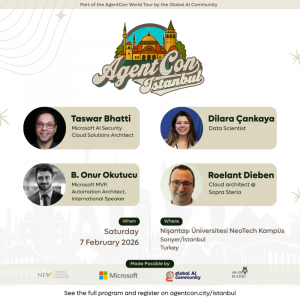
5. AgentCon Istanbul – 7th Feb 2026

AgentCon Istanbul 2026

AgentCon Istanbul 2026

Come and join us at AgentCon this Saturday, lots of amazing session you definitely don’t want to miss out, not to mention it is free, but do register to get a spot. https://globalai.community/chapters/istanbul/events/agentcon-istanbul/

Linkedin Newsletter

Hi everyone,

Your weekly dose of 5 Highlights Thursday is here, a list of information and links that you may find helpful in your Azure journey. Feel free to forward this along to anyone who you think may enjoy such sharing.

1. Microsoft partnership with Mistral AI

Microsoft on Monday announced a new partnership with French start-up Mistral AI as the U.S. tech giant seeks to expand its footprint in the fast-evolving artificial intelligence industry. Read more in the link below:

Mistral AI

Mistral AI

2. Research Forum Keynote: Research in the Era of AI

Peter Lee, Corporate Vice President, Microsoft Research and Incubations, discusses how recent developments in AI have transformed the way Microsoft approaches research.

3. Develop Your Copilot Skills (Part 2)

Artificial Intelligence (AI) is fundamentally changing how we relate to and benefit from technology. In this episode of the #AzureEnablementShow, Aaron and Natalie share some of the amazing—and FREE—training resources available to help you get the most out of #MicrosoftCopilot. In this second of three episodes, Natalie will share some of the video and self-paced learning resources available for GitHub Copilot, including Introduction to GitHub CoPilot, GitHub Copilot for Visual Studio, Learning AI with GitHub Copilot, and GitHub Copilot Fundamentals – Understand the AI pair programmer.

4. DevOps Security Capabilities in Defender CSPM

In this episode of Defender for Cloud in the Field, Charles Oxyer joins Yuri Diogenes to talk about DevOps security capabilities in Defender CSPM. Charles explains the importance of DevOps security in Microsoft CNAPP solution, what are the free capabilities available as part of Foundational CSPM, and what are the advanced DevOps security features included in Defender CSPM. Charles demonstrates how to improve the DevOps security posture by remediating recommendations, and how to use code to cloud contextualization with Cloud Security Explorer.

5. Microsoft Azure Virtual Training Day: AI Fundamentals – March 6th 2023

Explore core AI concepts at Azure Virtual Training Day: AI Fundamentals from Microsoft Learn. Join us for this free training event to learn how organizations use AI technology to solve real-world challenges and see how to build intelligent applications using Azure AI services. This training is suitable for anyone interested in AI solutions—including those in technical or business roles.

Azure Virtual Training Day

Azure Virtual Training Day


You can complement this edition of 5 Highlights Thursday with our MEA Developer Channel on YouTube where we have weekly interviews and learning material on Microsoft Azure, and much more.

And, as always, please give me feedback on LinkedIn. Which bullet above is your favorite? What do you want more or less of? Other suggestions? Please let me know.

Last by not least, know someone who might be interested in this newsletter? Share it with them.

Subscribe on LinkedIn

Have a wonderful Thursday 🙂

Taswar

Linkedin Newsletter

Hi everyone,

Your weekly dose of 5 Highlights Thursday is here, a list of information and links that you may find helpful in your Azure journey. Feel free to forward this along to anyone who you think may enjoy such sharing.

1. Demo of Azure AI & pgvector with Azure Database for PostgreSQL

This video showcases how you can improve the relevance of search results on a recipe website by using Azure OpenAI. Specifically the demo shows how you can use the new azure_ai (Preview) extension along with the open source pgvector extension and the Azure Database for PostgreSQL managed service to deliver semantic search results—as compared to search results you could obtain in the past via pattern matching with the LIKE clause in Postgres, or via Postgres full text search. The demo also shows how azure_ai gives you an integration between Azure Database for PostgreSQL and the Azure AI Language service, so you can do things like sentiment analysis, language detection, and PII redaction. In combination with the Azure Database for PostgreSQL service and pgvector, the new azure_ai extension to Postgres gives you the capability to build entirely new classes of applications—entirely in Postgres.

2. Encryption and Ledger in Azure SQL Database | Data Exposed

In this episode of Data Exposed, learn about the recent Azure SQL security innovations with Anna Hoffman and Pieter Vanhove.

3. Microsoft Fabric February 2024 Update

Read the Microsoft Fabric Feb Update. They have a lot of great features this month including Fabric Git Integration REST APIs, Fabric notebook status bar upgrade, Copilot in Dataflow Gen2, and many more!

Microsoft Fabric February 2024 Update

Microsoft Fabric February 2024 Update

4. Save money with Arc SQL Server licensing – what you need to know | Data Exposed

If you are used to traditional licensing options and pay for software assurance, you may wonder why you would ever use pay-as-you-go billing. In this episode of Data Exposed with Anna Hoffman and Sasha Nosov, we’ll cover how to use our new PayG model and understand how you can use Extended Security Updates.

5. MVP TechBytes – An Overview of Azure Virtual Desktop with Mahammad Kubaib

Dive into Azure Virtual Desktop with MVP Tech Bytes! 💻 Join Mahammad Kubaib and Taswar Bhatti to explore its benefits, deployment, and configuration. Discover how Azure Virtual Desktop can streamline and secure your virtual desktop experience. Don’t miss out on expanding your software development skills.


You can complement this edition of 5 Highlights Thursday with our MEA Developer Channel on YouTube where we have weekly interviews and learning material on Microsoft Azure, and much more.

And, as always, please give me feedback on LinkedIn. Which bullet above is your favorite? What do you want more or less of? Other suggestions? Please let me know.

Last by not least, know someone who might be interested in this newsletter? Share it with them.

Subscribe on LinkedIn

Have a wonderful Thursday 🙂

Taswar

MVP TechBytes

Dive into Azure Virtual Desktop with MVP Tech Bytes! 💻 Join Mahammed Kubaibi and Taswar Bhatti to explore its benefits, deployment, and configuration. Discover how Azure Virtual Desktop can streamline and secure your virtual desktop experience. Don’t miss out on expanding your software development skills.

To learn more:

🔗 YouTube channel:    / @vdibuzz  

🔗Udemy: https://www.udemy.com/user/mahammad-kubaib/

🔗 Blog: https://vdiclub.wordpress.com/blog-2/

Summary

What is Azure Virtual Desktop:
Azure Virtual Desktop is a cloud service that provides application and desktop virtualization hosted on Microsoft’s cloud. It allows users to access their Windows desktops and applications from any device and location.

Benefits of Azure Virtual Desktop:
Azure Virtual Desktop has many benefits, such as: simplicity, security, cost-effectiveness, scalability, flexibility, and sustainability. It enables users to work from anywhere, use their own devices, reduce hardware and licensing costs, adjust the number of virtual machines according to demand, and lower the environmental impact of e-waste.

Licensing and prerequisites for Azure Virtual Desktop:
Azure Virtual Desktop requires a Microsoft subscription, an identity provider (Azure Active Directory and Active Directory), an operating system license, a network connectivity to Microsoft cloud URLs, and a remote desktop client. Users with Office 365, Windows Enterprise, or Education licenses can use Azure Virtual Desktop for free, and only pay for the Azure infrastructure costs.

Architecture and types of Azure Virtual Desktop:
Azure Virtual Desktop has a PaaS model, where some components are managed by Microsoft (control plane) and some are managed by the customer (virtual machines, applications, Azure files, and Active Directory). The customer can choose between two types of virtual desktops: personal or pooled, and single session or multi session. Personal desktops are dedicated to one user, while pooled desktops are shared by multiple users. Single session desktops allow only one user per virtual machine, while multi session desktops allow more than one user per virtual machine

Linkedin Newsletter

Hi everyone,

Your weekly dose of 5 Highlights Thursday is here, a list of information and links that you may find helpful in your Azure journey. Feel free to forward this along to anyone who you think may enjoy such sharing.

1. Satya highlights AI transformation in India

While visiting India, Microsoft CEO Satya Nadella sat down for an interview with CNBC and discussed the AI transformation we’re living through. He said AI is “tangibly changing economic productivity.”

2. Security Update Release Summary February 2024

Our February mini-briefing video includes an overview of the release and then a discussion of a few items from today’s release.

3. Develop Your Copilot Skills (Part 1)

We are entering a new era of AI—one that is fundamentally changing how we relate to and benefit from technology. In this episode of the #AzureEnblementShow, Aaron and Natalie share some of the amazing—and FREE—training resources available to help you get the most out of #MicrosoftCopilot. In this first of three episodes, you’ll get an overview of Copilot, learn about Copilot for Microsoft 365, and get a look at some of the skilling resources for Dynamics 365 and Power Platform. Be sure to stay tuned for episodes two and three, when we’ll dive a little deeper into the resources being offered for GitHub Co-Pilot and demo one of the learning paths that is available to you.

4. Microsoft unveils Face Check for secure identity verification

Check out Face Check, the latest addition to our Entra Verified ID digital identity platform. Face Check, powered by Azure AI, allows businesses to match a user’s selfie to their government ID or employee credentials, providing an extra layer of security for sensitive operations like password resets or help desk access #secruty #microsoftentraid

Entra

5. Azure Takeoff – Azure Availability Sets

Join Taswar Bhatti & Hatim Nagarwala to learn how to ensure high availability and reliability for your Azure VMs. Discover availability options like availability sets, zones, and proximity placement groups. See a demo of creating and configuring availability sets in Azure portal. Master best practices for your Azure VMs’ resilience journey.


You can complement this edition of 5 Highlights Thursday with our MEA Developer Channel on YouTube where we have weekly interviews and learning material on Microsoft Azure, and much more.

And, as always, please give me feedback on LinkedIn. Which bullet above is your favorite? What do you want more or less of? Other suggestions? Please let me know.

Last by not least, know someone who might be interested in this newsletter? Share it with them.

Subscribe on LinkedIn

Have a wonderful Thursday 🙂

Taswar

MVP TechBytes
Don’t miss me and Betim Beja on MVP TechBytes discussing Power Platform PCF Development!
Learn about code component pros/cons, framework mockups, standard vs virtual components, and contributing to open-source projects.

Summary

In this episode Betim, a Microsoft MVP, talks about code components for the Power Platform and how to use Storybook to test and showcase them.

The benefits and challenges of code components: Code components allow professional developers to extend the Power Platform and help low-code developers to deliver solutions faster and bettr. However, code components also have some limitations, such as the test harness, the Web API, and the virtual components.

The role of component framework mock and Storybook: Betim has created a component framework mock that mocks the whole API of the component framework and integrates it with Storybook, a tool that helps to build and display components in different scenarios and configurations. This way, developers can test their components more easily and collaborate with other stakeholders.

The examples of code components: Betim shows some examples of code components, such as the colorful option set, the switches, the audio player, and the calendar. He also explains how to set up stories and how to use citations for the components.

The call for action for the viewers: Betim invites the viewers to check out his GitHub repository and blog post where he shares his code components and how to use them. He also encourages the viewers to contribute to the component framework mock and to use it for their own components.910

Azure Takeoff Show
Join Me & Hatim Nagarwala to learn how to ensure high availability and reliability for your Azure VMs.
Discover availability options like availability sets, zones, and proximity placement groups.
See a demo of creating and configuring availability sets in Azure portal.
Master best practices for your Azure VMs’ resilience journey.

Learn More:
https://learn.microsoft.com/en-us/azure/virtual-machines/availability-set-overview

Summary

Ensuring High Availability for your Virtual Machines in Azure

When it comes to running virtual machines in the cloud, one of the key concerns is ensuring high availability. In Azure, there are several options available to help you achieve this, including availability sets, availability zones, and proximity placement groups.

Availa2bility Sets

Availability sets are a way to ensure that your virtual machines are distributed across multiple physical hardware units within a data center. This helps to mitigate the impact of hardware failures, power interruptions, or other issues that might affect a single hardware unit.

It’s important to 4note that existing virtual machines cannot be added to an availability set; you need to create new virtual machines to join an availability set.

Availability Zones

Availability zones take the concept of availability sets a step further by distributing your virtual machines across multiple data centers within a region. This helps to protect against larger-scale issues that might affect an entire data center, such as natural disasters or power outages.

Proximity Placement Groups

Proximity placement groups are used when you need to ensure low latency between virtual machines. By placing virtual machines in a proximity placement group, you can ensure that they are physically located close to each other within a data center.

In summary, Azure provides several options to help you ensure high availability for your virtual machines. By using availability sets, availability zones, and proximity placement groups, you can protect against hardware failures, power interruptions, and other issues that might impact the availability of your virtual machines.

Linkedin Newsletter

Hi everyone,

Your weekly dose of 5 Highlights Thursday is here, a list of information and links that you may find helpful in your Azure journey. Feel free to forward this along to anyone who you think may enjoy such sharing.

1.Mr. Maedas Cozy AI Kitchen: Designing Trust with Sarah Gold

Sarah Gold, Founder and CEO of Projects by IF, is the guest in the Cozy AI Kitchen this week. Together with John Maeda, they discuss the meaning of ‘trust’ and ‘trustworthy’ in an AI world.

2. Build a recommender Full stack App using OpenAI and Azure SQL: Step-by-Step Guide

Check out this step-by-step guide for creating an intelligent web app with #AzureOpenAI Service. This blog post shows you how to create a recommender full stack app with OpenAI and #AzureSQL.

OpenAI Azure

3. How to Convert Audio to .WAV for Speech Service Using MoviePy

Azure Speech Service requires audio files to adhere to specific standards. Find out how to use MoviePy to easily convert your audio files to make them compatible with #Azure Speech Service.

MoviePy

4. Build a production RAG using Azure AI Studio & Prompt Flow

Learn how to build a production-level RAG app for a customer support agent – and integrate it with your web-based product catalog. Streamline your end-to-end app development from prompt engineering to LLMOps with prompt flow in #Azure #AI Studio.

PromptFlow

5. MVP TechBytes – Message Brokers for Microservices Communication with Mukhammadkarim Tukhtaboev

Join me and Mukhammadkarim Tukhtaboev‘s discussion on microservices and message brokers in this MVP TechBytes episode. Learn about improving application performance, choosing communication methods, comparing Kafka and RabbitMQ, and setting up RabbitMQ in a.NET app with a live demo. Enhance your software development skills now. 🚀


You can complement this edition of 5 Highlights Thursday with our MEA Developer Channel on YouTube where we have weekly interviews and learning material on Microsoft Azure, and much more.

And, as always, please give me feedback on LinkedIn. Which bullet above is your favorite? What do you want more or less of? Other suggestions? Please let me know.

Last by not least, know someone who might be interested in this newsletter? Share it with them.

Subscribe on LinkedIn

Have a wonderful Thursday 🙂

Taswar

MVP TechBytes

Here is video I did with Mukhammadkarim (from Uzbekistan) where we discuss on microservices and message brokers on MVP TechBytes episode. Learn about improving application performance, choosing communication methods, comparing Kafka and RabbitMQ, and setting up RabbitMQ in a.NET app with a live demo. Enhance your software development skills now.

🚀 To learn more about Mukhammadkarim:

🔗Twitter Handle:   / dotnetgooo  

🔗Blog: https://dotnetgo.com

🔗YouTube channel:    / dotnetuz  

🔗LinkedIn:   / mukhammadkarim-tukhtaboev 


Summary

Message Brokers in Microservice Architecture

In a recent episode of MVP TechBytes, Taswar and Mokhammadkarim discussed the benefits and challenges of using message brokers in microservice architecture. Mokhammadkarim, a software engineer with 10 years of experience in the field, shared his insights on the topic.

Mokhammadkarim began by explaining the difference between monolith and microservice architecture. In monolith architecture, there is a single deployable application, which can be difficult to scale and maintain. On the other hand, microservice architecture consists of a collection of independent and deployable services that can distribute the load and handle failures better.

One of the benefits of microservice architecture is the ability to distribute applications and pressures to multiple services and servers. This can help to distribute client requests and prevent system crashes. Additionally, if there is an error or exception in one service, it does not affect the other services, unlike in monolith architecture where a crash in one part of the system can bring down the entire system.

Taswar and Mokhammadkarim then discussed the role of message brokers in microservice architecture. A message broker is a third-party application that facilitates asynchronous communication between services. It can collect, store, and deliver messages to the appropriate consumers. It can also help with load balancing, fault tolerance, and decoupling.
There are several types of message brokers available, including Rabbit MQ and Kafka. Rabbit MQ is more reliable and flexible for queuing and delivering messages, while Kafka is more suitable for streaming and distributing large amounts of data. The choice of message broker depends on the specific needs of the application.

Mokhammadkarim also demonstrated how to set up Rabbit MQ in a .net application, including installing Rabbit MQ, the Erlang programming language, and the Rabbit MQ client library for .net. He showed how to create a custom service, a controller, and publisher and consumer methods for sending and receiving messages.

In summary, message brokers can provide many benefits in microservice architecture, including improved scalability, fault tolerance, and decoupling. The choice of message broker depends on the specific needs of the application, and there are several options available, including Rabbit MQ and Kafka.

UA-4524639-2