Recently I was asked a simple code to improve the performance, and at first I couldn’t see it but as you know your brain starts working when you aren’t thinking of the problem anymore. (It happen to me when I was driving) Anyway the problem on hand was there is a for loop and when […]
Here is some poorly written code that I had to review today and modify (i.e refactor). I have removed the domain of the code and renamed the variables, so that it remains anonymous, but the just of the code is still intact.
|
1 2 3 4 5 6 7 8 9 10 11 12 13 14 |
var itemCount = 0; if (users.ShoppingCart != null && user.ShoppingCart > 0) { foreach (var cart in user.ShoppingCart) { if (cart.Items != null && cart.Items.Count > 0) { foreach (var item in cart.Items) { itemCount++; } } } } |
Lets go through the inner loop of the code first. First the […]
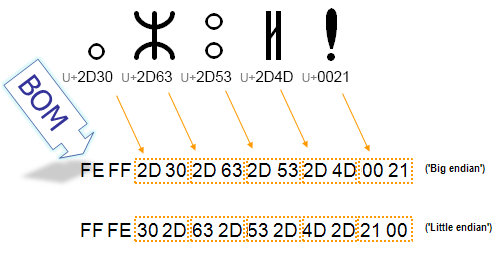
Here is a quick way to detect if a text is in Canadian Aboriginal Syllabic in C#. It is just an extension method that would detect if your string is in that range by using regex.
|
1 2 3 4 5 6 7 8 9 10 11 12 13 14 |
public static bool IsInuktitut(this string input) { if (string.IsNullOrEmpty(input)) { return false; } //http://msdn.microsoft.com/en-us/library/20bw873z.aspx //look at section Supported Named Blocks const string pattern = @"\p{IsUnifiedCanadianAboriginalSyllabics}"; Match match = Regex.Match(input, pattern); return match.Success; } |
Enjoy.
Here is a nice little code I did recently, where the Command Pattern is used with a notification observer like pattern. First of the Command Pattern, a simple interface for task with an execute method
|
1 2 3 4 5 6 7 |
public interface ITask { /// <summary> /// Execute the task /// </summary> void Execute(); } |
Then the notification interface, with 2 methods, one when it started and one when its complete and the event […]
In this last part of the series I wanted to talk about how to register automapper at startup of your web application, in doing so it would help speed things up with automapper. There are many ways to do it, the easiest way is to just have a method inside Global.asax.cs file in your Application_Start […]
In this part I will show how we can use a customer value formatter (CustomFormatter) to format our mapped data into single “Number of Order:” and plural “Number of Orders:”. First the Domain and Dto (data transfer object)
|
1 2 3 4 5 6 7 8 9 10 11 12 13 14 15 16 17 18 19 20 21 |
//Domain public class Order { public string OrderNo { get; set; } public Customer Customer { get; set; } public DateTime PurchaseDate { get; set; } public IEnumerable<OrderItems> LineItems { get; set; } public bool ShipToHomeAddress { get; set; } public decimal GetTotal() { return LineItems == null ? 0 : LineItems.Sum(x => x.GetTotalPrice()); } public Guid InternalId { get; set; } } //Dto public class NumberOfOrderDto { public string CustomerName { get; set; } public string NumberOfOrders { get; set; } } |
Now we will introduce a CustomResolver and Formatter, for the Formatter we are inheriting from IValueFormatter […]
In Part 5, we will use a powerful feature that automapper allows us, which is CustomResolver. Lets look at our Domain Object which contains a boolean field called ShipToHomeAddress, what we will do is map those boolean to a string value with “Yes” or “No”.
|
1 2 3 4 5 6 7 8 9 10 11 12 13 14 15 16 17 18 19 20 |
public class Order { public string OrderNo { get; set; } public Customer Customer { get; set; } public DateTime PurchaseDate { get; set; } public IEnumerable<OrderItems> LineItems { get; set; } public bool ShipToHomeAddress { get; set; } public decimal GetTotal() { return LineItems == null ? 0 : LineItems.Sum(x => x.GetTotalPrice()); } public Guid InternalId { get; set; } } //DTO public class OrderShipDto { public string ShipHome { get; set; } public string CustomerName { get; set; } } |
For our mapping code we will introduce CustomResolver class […]
In Part 4 we will see how we can use projection to map inner objects for example a DateTime field. Again our domain and Dto (Data Transfer Object) looks like
|
1 2 3 4 5 6 7 8 9 10 11 12 13 14 15 16 17 18 19 20 21 22 |
//Order public class Order { public string OrderNo { get; set; } public Customer Customer { get; set; } public DateTime PurchaseDate { get; set; } public IEnumerable<OrderItems> LineItems { get; set; } public bool ShipToHomeAddress { get; set; } public decimal GetTotal() { return LineItems == null ? 0 : LineItems.Sum(x => x.GetTotalPrice()); } public Guid InternalId { get; set; } } //Dto public class OrderDateDto { public int PurchaseHour { get; set; } public int PurchaseMinute { get; set; } public string CustomerName { get; set; } } |
We will map the PurchaseDate in the Domain Object to our Dto PurchaseHour and Purchase Minute.
|
1 2 3 4 5 6 7 8 9 10 11 12 13 14 15 16 17 |
public ActionResult OrderDate() { var order = _respository.Get(3); order.PurchaseDate = new DateTime(2011, 3, 15, 20, 30, 0); Mapper.CreateMap<Order, OrderDateDto>() .ForMember(dest => dest.PurchaseHour, opt => opt.MapFrom(src => src.PurchaseDate.Hour)) .ForMember(dest => dest.PurchaseMinute, opt => opt.MapFrom(src => src.PurchaseDate.Minute)); var model = Mapper.Map<Order, OrderDateDto>(order); return View(model); } //View <h2>OrderDate</h2> @Model.CustomerName @Model.PurchaseHour @Model.PurchaseMinute |
As you can see the View now […]
In this part we learn about Nested Mapping in Automapper and we will use the same OrderDto Object that we had previously but we will let Automapper to map the inner objects. Once again here is the Domain Objects First
|
1 2 3 4 5 6 7 8 9 10 11 12 13 14 15 16 17 18 19 20 21 22 23 24 25 26 |
//Order public class Order { public string OrderNo { get; set; } public Customer Customer { get; set; } public DateTime PurchaseDate { get; set; } public IEnumerable<OrderItems> LineItems { get; set; } public bool ShipToHomeAddress { get; set; } public decimal GetTotal() { return LineItems == null ? 0 : LineItems.Sum(x => x.GetTotalPrice()); } public Guid InternalId { get; set; } } //OrderItems public class OrderItems { public decimal Price { get; set; } public string Name { get; set; } public int Quantity { get; set; } public decimal GetTotalPrice() { return Price * Quantity; } } |
The Dto (Data Transfer Object) look like
|
1 2 3 4 5 6 7 8 9 10 11 12 13 14 15 |
public class OrderDto { public string CustomerName { get; set; } public decimal Total { get; set; } public string OrderNumber { get; set; } public IEnumerable<OrderItemsDto> LineItems { get; set; } } //OrderItemsDto public class OrderItemsDto { public string Name { get; set; } public int Quantity { get; set; } public decimal Price { get; set; } } |
This time when we map Order […]
In this part I will be showing how Automapper uses flattening by convention. If we look at our OrderDto we will see that it has a IEnumerable of OrderItemsDto and also something called OrderNumber. This is the type of object we want to send to our presentation layer.
|
1 2 3 4 5 6 7 |
public class OrderDto { public string CustomerName { get; set; } public decimal Total { get; set; } public string OrderNumber { get; set; } public IEnumerable<OrderItemsDto> LineItems { get; set; } } |
Compare that to our domain object […]