Sample code located at https://github.com/taswar/CohereCommandAPlusDemo
Enterprise AI teams have a familiar problem. You need multilingual support because your users are in Germany, Japan, and Brazil. You need document understanding because half your data lives in scanned PDFs and screenshots. You need tool calling because your agents have to actually do things, not just talk about them. And you need reasoning across long contexts because business decisions rarely fit in 4K tokens.
Historically, that meant stitching together three or four models. One for translation. One for OCR. One for reasoning. Something in the middle to orchestrate all of it. That is a lot of moving parts to keep in production.
Cohere Command A+ in Microsoft Foundry is designed to collapse that stack.
Announced as a Direct from Azure model, Command A+ is Cohere’s latest open enterprise model — and their first mixture-of-experts (MoE) architecture. It brings together reasoning, long-context understanding, tool use, multilingual support, and multimodal input in a single model.
Honestly, this is the sort of release that matters more than the benchmark numbers suggest.
What Makes Command A+ Different
Three things are worth understanding before you evaluate this model.
It is a Mixture-of-Experts Model
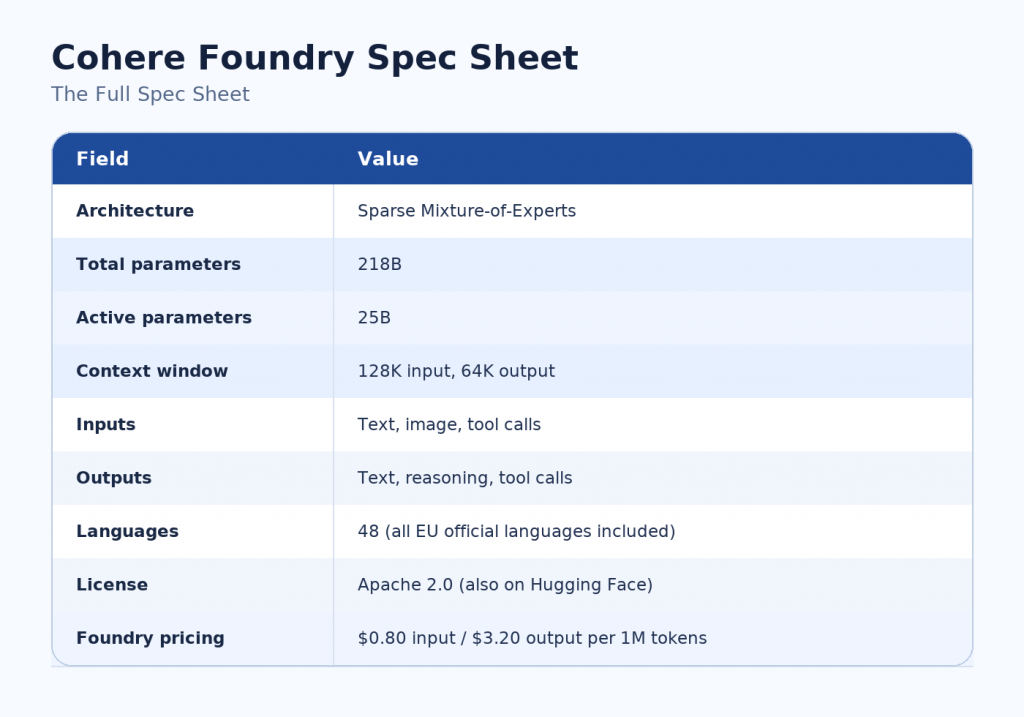
218 billion total parameters. 25 billion active per token. That is roughly 11.5% activation.
If you have not worked with MoE architectures before, the short version: instead of every token going through every parameter, the model routes each token to a subset of “expert” sub-networks. You get the knowledge coverage of a large model at the inference cost of a much smaller one.
For enterprise workloads, this matters. Cohere lists hardware requirements of 1× B200 or 2× H100 at W4A4 quantization. That is a genuinely deployable footprint for a model with this level of capability.
It Speaks 48 Languages
Not “supports” — actually speaks. All official EU languages included. If you are building for a global enterprise, that is a compliance requirement in many places, not a nice-to-have.
It Handles Text and Images Together
Command A+ accepts text and image inputs. That opens up document processing scenarios where the useful information lives in charts, tables, screenshots, or scanned records — not just plain text.
The Full Spec Sheet
Where This Model Actually Fits
Cohere positions Command A+ for four workload types. Each one lines up with a real problem developers deal with in production.
1. Enterprise Agents
Agents that reason, plan, and call tools across multi-step workflows. Command A+ handles all four capabilities — reasoning, planning, tool use, and long context — in one model. If you are building agentic systems today with three different models glued together, this is worth evaluating as a consolidation play.
2. Knowledge Assistants and RAG
RAG applications over internal documents, policies, contracts, and knowledge bases. The 128K context window means you can fit a lot of retrieved chunks into a single call without aggressive truncation. Combined with multilingual support, this is well suited to global enterprises where the same knowledge base needs to answer questions in multiple languages.
3. Document Analysis Workflows
Summarising reports, extracting terms from contracts, comparing policies, analysing research papers. The multimodal input means it handles documents that mix text with charts, tables, and images — the kind of enterprise content where “just OCR it and pass to an LLM” produces bad results.
4. Multilingual Applications
Global customer support. Regional compliance reporting. Cross-market analytics. Command A+ was designed with 48-language coverage as a first-class feature, not a translation layer bolted on afterward.
That is a pretty focused positioning. This is not a general-purpose chatbot model — it is an enterprise agent and document processing model.
Enough Theory. Let’s Actually Call It from C#
Here is a working .NET console app that calls Command A+ through Azure AI Foundry. I am using the Azure AI Inference SDK with DefaultAzureCredential for Entra ID auth — no API keys in code.
Prerequisites
|
1 2 3 4 |
dotnet new console –n CohereCommandAPlusDemo cd CohereCommandAPlusDemo dotnet add package Azure.AI.Inference —prerelease dotnet add package Azure.Identity |
Set your environment variables:
|
1 2 3 |
# On Windows (PowerShell) $env:AZURE_AI_CHAT_ENDPOINT = “https://YOUR-RESOURCE.services.ai.azure.com/models” $env:AZURE_AI_MODEL = “cohere-command-a-plus” |
Program.cs — Contract Analysis Example
Rather than a “tell me a joke” demo, let’s do something that actually shows what Command A+ is good at. Here is a service that analyses a business contract and returns a structured summary — the kind of workflow you might drop into a document management pipeline.
|
1 2 3 4 5 6 7 8 9 10 11 12 13 14 15 16 17 18 19 20 21 22 23 24 25 26 27 28 29 30 31 32 33 34 35 36 37 38 39 40 41 42 43 44 45 46 47 48 49 50 51 52 53 54 55 56 57 58 59 60 61 62 63 64 65 66 67 68 69 70 71 72 73 74 75 76 77 78 79 80 81 82 83 84 85 86 87 88 89 90 91 92 93 94 95 96 97 98 99 100 101 102 103 104 105 106 |
using Azure.AI.Inference; using Azure.Identity; using Azure.Core; var endpoint = Environment.GetEnvironmentVariable(“AZURE_AI_CHAT_ENDPOINT”) ?? throw new InvalidOperationException(“Set AZURE_AI_CHAT_ENDPOINT environment variable.”); var model = Environment.GetEnvironmentVariable(“AZURE_AI_MODEL”) ?? “cohere-command-a-plus”; // DefaultAzureCredential handles Entra ID auth — no API key in code. // Sign in first with: az login var credential = new DefaultAzureCredential(new DefaultAzureCredentialOptions { ExcludeManagedIdentityCredential = true }); // Foundry (Cognitive Services) endpoints require a token whose audience is // https://cognitiveservices.azure.com. Force that scope regardless of the // scope the Azure.AI.Inference SDK requests by default. var scopedCredential = new ScopeOverrideCredential( credential, “https://cognitiveservices.azure.com/.default”); var client = new ChatCompletionsClient(new Uri(endpoint), scopedCredential); var options = new ChatCompletionsOptions { Model = model, Temperature = 0.1f, MaxTokens = 2000 }; options.Messages.Add(new ChatRequestSystemMessage( “”“ You are a senior contracts analyst reviewing enterprise agreements. Your job is to extract key terms and flag risks. Be precise and cite the exact contract language when identifying issues. If a required clause is missing, say so explicitly rather than guessing at its content. Return your analysis as structured JSON with these fields: -parties: array of parties to the agreement – effective_date: string or “not specified“ – term_length: string or “not specified“ – renewal_terms: string or “not specified“ – key_obligations: array of strings – liability_cap: string or “not specified“ – termination_clauses: array of strings – risks: array of { severity: “high“|”medium“|”low“, description: string} ““”)); options.Messages.Add(new ChatRequestUserMessage( “”“ Analyze the following service agreement excerpt: — SOFTWARE LICENSING AGREEMENT This Agreement is entered into on 1 August 2026 between Zeytin Software Ltd (“Licensor“) and GlobalCorp Industries GmbH (“Licensee“). 1.LICENSE GRANT.Licensor grants Licensee a non-exclusive, non-transferable license to use the Software during the Term. 2. TERM. This Agreement shall commence on the Effective Date and continue for an initial period of three (3) years, automatically renewing for successive one (1) year periods unless either party provides ninety (90) days written notice of non-renewal. 3. FEES. Licensee shall pay an annual license fee of EUR 250,000. 4. LIABILITY. IN NO EVENT SHALL LICENSOR’S AGGREGATE LIABILITY EXCEED THE FEES PAID BY LICENSEE IN THE TWELVE (12) MONTHS PRECEDING THE CLAIM. 5. TERMINATION. Either party may terminate this Agreement for material breach if such breach is not cured within thirty (30) days of written notice. — ““”)); Console.WriteLine($“Calling model: {model}”); Console.WriteLine(“—“); var response = await client.CompleteAsync(options); Console.WriteLine(response.Value.Content); // Wraps a TokenCredential and forces a fixed audience/scope, ignoring the // scope the client pipeline asks for. sealed class ScopeOverrideCredential : TokenCredential { private readonly TokenCredential _inner; private readonly string[] _scopes; public ScopeOverrideCredential(TokenCredential inner, string scope) { _inner = inner; _scopes = new[] { scope }; } public override AccessToken GetToken(TokenRequestContext requestContext, CancellationToken cancellationToken) => _inner.GetToken(new TokenRequestContext(_scopes), cancellationToken); public override ValueTask<AccessToken> GetTokenAsync(TokenRequestContext requestContext, CancellationToken cancellationToken) => _inner.GetTokenAsync(new TokenRequestContext(_scopes), cancellationToken); } |
Expected Output
Command A+ should return something like:
|
1 2 3 4 5 6 7 8 9 10 11 12 13 14 15 16 17 18 19 20 21 22 23 24 25 26 27 28 29 30 31 32 33 34 35 36 37 38 39 40 41 42 43 44 45 46 47 48 49 50 51 52 |
Calling model: Cohere–command–a–plus–05–2026 —– ```json { “parties”: [ “Zeytin Software Ltd (Licensor)”, “GlobalCorp Industries GmbH (Licensee)” ], “effective_date”: “1 August 2026”, “term_length”: “3 years (initial)”, “renewal_terms”: “Automatic renewal for successive one-year periods unless either party provides ninety (90) days written notice of non-renewal.”, “key_obligations”: [ “Licensor grants Licensee a non-exclusive, non-transferable license to use the Software during the Term.”, “Licensee shall pay an annual license fee of EUR 250,000.” ], “liability_cap”: “Licensor’s aggregate liability is capped at the fees paid by Licensee in the twelve (12) months preceding the claim.”, “termination_clauses”: [ “Either party may terminate for material breach if the breach is not cured within thirty (30) days after written notice.”, “Non-renewal terminates the Agreement upon provision of ninety (90) days written notice.” ], “risks”: [ { “severity”: “high”, “description”: “Liability cap limited to fees paid in the prior 12 months may be insufficient to cover actual damages, exposing Licensee to significant risk if a major incident occurs.” }, { “severity”: “high”, “description”: “Material breach clause lacks definition of what constitutes a material breach, creating uncertainty and potential disputes over termination rights.” }, { “severity”: “high”, “description”: “No provision for warranties, indemnities, or remedies for software defects, leaving Licensee without recourse for faulty software.” }, { “severity”: “medium”, “description”: “Governing law and dispute resolution mechanisms are absent, which may complicate enforcement and litigation.” }, { “severity”: “medium”, “description”: “No confidentiality or data protection provisions, increasing risk of unauthorized disclosure or misuse of sensitive information.” }, { “severity”: “medium”, “description”: “License is non-transferable, limiting Licensee’s ability to assign or sublicense the software in future corporate restructurings.” }, { “severity”: “low”, “description”: “Automatic renewal may lead to unintended continued licensing if the parties forget to provide the ninety‑day non‑renewal notice.” } ] } ``` |
That is structured, actionable output — the kind of thing you can pipe directly into a downstream review workflow or store as document metadata.
Multilingual Example — Same Prompt, Different Language
One of the more interesting things about Command A+ is that you can run the same structured prompt with content in any of 48 languages and get consistent output structure back. Here is the same analysis pattern with a German contract excerpt:
|
1 2 3 4 5 6 7 8 9 10 11 12 13 14 15 16 17 18 19 20 21 22 23 24 25 26 27 28 29 30 31 32 33 34 35 36 37 |
options.Messages.Clear(); Console.WriteLine($“Calling Multilingual: {model}”); options.Messages.Add(new ChatRequestSystemMessage( “”“ You are a senior contracts analyst. Return your analysis in English JSON even if the source contract is in another language. ““”)); options.Messages.Add(new ChatRequestUserMessage( “”“ Analysiere den folgenden Vertragsauszug: — DIENSTLEISTUNGSVERTRAG Dieser Vertrag wird zwischen der Zeytin Software GmbH (" Auftragnehmer & quot;) und der Berliner Handelsgesellschaft mbH (" Auftraggeber & quot;) geschlossen. § 1 VERTRAGSGEGENSTAND.Der Auftragnehmer verpflichtet sich zur Bereitstellung von Softwareentwicklungsleistungen. § 2 LAUFZEIT. Der Vertrag beginnt am 15. September 2026 und läuft für eine Erstlaufzeit von zwei (2) Jahren. § 3 VERGÜTUNG. Der Auftraggeber zahlt einen monatlichen Betrag von EUR 18.500 zzgl. gesetzlicher Umsatzsteuer. § 4 KÜNDIGUNG. Der Vertrag kann von beiden Seiten mit einer Frist von drei Monaten zum Ende eines Kalenderjahres gekündigt werden. — ““”)); response = await client.CompleteAsync(options); Console.WriteLine(response.Value.Content); |
Sample output of Multilingual
123456789101112131415161718192021222324252627282930313233343536373839
Calling Multilingual: Cohere–command–a–plus–05–2026{ “contract_type”: “Service Agreement”, “parties”: { “contractor”: “Zeytin Software GmbH”, “client”: “Berliner Handelsgesellschaft mbH” }, “subject_matter”: “Contractor agrees to provide software development services.”, “term”: { “start_date”: “2026-09-15”, “initial_term”: “2 years” }, “compensation”: { “amount_per_month”: 18500, “currency”: “EUR”, “taxes”: “plus statutory VAT” }, “termination”: { “notice_period”: “3 months”, “termination_date_alignment”: “end of calendar year”, “available_to”: “both parties” }, “key_provisions”: [ “Monthly payment of €18,500 plus VAT.”, “Either party may terminate with 3 months’ notice to the end of a calendar year.” ], “risk_assessment”: { “early_termination_risk”: “Since the contract starts on 15 September 2026, the first possible termination date is 31 December 2026, requiring notice by 30 September 2026 – only 15 days after commencement.”, “scope_ambiguity”: “The contract does not define the scope of software development services, deliverables, milestones, or acceptance criteria.”, “payment_structure”: “Fixed monthly fee without performance-based adjustments; no provision for price revisions or inflation.” }, “recommendations”: [ “Define service scope, deliverables, milestones, and acceptance criteria in an annex or statement of work.”, “Consider adding a price review clause (e.g., annual adjustment based on CPI).”, “Clarify whether termination notices must be in writing and specify the exact method of delivery.”, “Include governing law and dispute resolution provisions explicitly.”, “Address intellectual property rights, confidentiality, and data protection obligations.” ]}
|
1 2 3 4 5 6 7 8 9 10 11 12 13 14 15 16 17 18 19 20 21 22 23 24 25 26 27 28 29 30 31 32 33 34 35 36 37 38 39 |
Calling Multilingual: Cohere–command–a–plus–05–2026 { “contract_type”: “Service Agreement”, “parties”: { “contractor”: “Zeytin Software GmbH”, “client”: “Berliner Handelsgesellschaft mbH” }, “subject_matter”: “Contractor agrees to provide software development services.”, “term”: { “start_date”: “2026-09-15”, “initial_term”: “2 years” }, “compensation”: { “amount_per_month”: 18500, “currency”: “EUR”, “taxes”: “plus statutory VAT” }, “termination”: { “notice_period”: “3 months”, “termination_date_alignment”: “end of calendar year”, “available_to”: “both parties” }, “key_provisions”: [ “Monthly payment of €18,500 plus VAT.”, “Either party may terminate with 3 months’ notice to the end of a calendar year.” ], “risk_assessment”: { “early_termination_risk”: “Since the contract starts on 15 September 2026, the first possible termination date is 31 December 2026, requiring notice by 30 September 2026 – only 15 days after commencement.”, “scope_ambiguity”: “The contract does not define the scope of software development services, deliverables, milestones, or acceptance criteria.”, “payment_structure”: “Fixed monthly fee without performance-based adjustments; no provision for price revisions or inflation.” }, “recommendations”: [ “Define service scope, deliverables, milestones, and acceptance criteria in an annex or statement of work.”, “Consider adding a price review clause (e.g., annual adjustment based on CPI).”, “Clarify whether termination notices must be in writing and specify the exact method of delivery.”, “Include governing law and dispute resolution provisions explicitly.”, “Address intellectual property rights, confidentiality, and data protection obligations.” ] } |
You get the same JSON structure back, with German-language terms parsed correctly and the analysis delivered in English. That is genuinely useful for global enterprises where legal teams work in local languages but reporting rolls up centrally.
Why Run It on Microsoft Foundry Instead of Cohere Direct?
Cohere offers Command A+ through their own API and on Hugging Face under Apache 2.0. So why bother with Foundry?
If you are already in Azure, Foundry gives you a few things you cannot easily replicate elsewhere:
- Entra ID authentication — no API keys in source, no separate credential management
- Enterprise governance — data residency, compliance, audit logging built into the platform
- Side-by-side model evaluation — compare Command A+ against Kimi K2.7 Code, Claude Opus 4.8, or GPT-4o on the same dataset without setting up multiple SDKs
- Unified billing — one Azure invoice covers all models, not one bill per vendor
- Foundry Agent Service and RAG pipelines — plug Command A+ directly into Foundry’s agentic infrastructure
For an enterprise team already invested in Azure, Foundry is the easier operational choice. For solo experimentation or non-Azure deployments, direct API or self-hosting on Hugging Face makes sense too.
Final Thoughts
Command A+ is not the flashiest model announcement of the year. It is not going to top general-purpose benchmarks. But it is genuinely positioned for a class of enterprise problems that have been underserved: multilingual agentic workflows over multimodal documents at reasonable cost.
If your team is building enterprise agents, RAG applications, or document analysis pipelines — especially with multilingual requirements — this is worth evaluating alongside your existing models. At $0.80 input / $3.20 output per million tokens, it is priced to compete for real production workloads.
The MoE architecture is also worth watching more broadly. Expect more of the frontier lab releases over the next 12 months to go this route. Command A+ is an early mainstream option to build intuition against.
If your team already builds RAG over internal documents, ships multilingual applications, or runs agentic workflows in production — this is one worth wiring into your evaluation harness. 🙂