In my Claude Opus 5.5 for C# developers post I called Opus 5.5 from my own code: the Anthropic.Foundry SDK, Entra ID, and the effort parameter. This time the code calling Opus 5.5 isn’t mine. It’s Claude Code, running in my terminal and in VS Code, pointed at my Foundry resource.
Microsoft already has a good step-by-step setup guide for Claude Code on Microsoft Foundry in VS Code, so I’m not going to repeat it. If you’ve never connected Claude Code to Microsoft Foundry, start there. This post is about what happens after it connects, when the model on the other end is Opus 5.5: how to make sure you’re actually talking to it, which dial to turn, and where the tokens go when you’re not looking.
Why Opus 5.5 Changes the Claude Code Setup
A quick recap of what shipped, and what each change means inside Claude Code:
- It’s 40% cheaper than Opus 5. $4/M input, $20/M output, and $0.20/M cache reads. Claude Code sessions are mostly re-read context, so the cache price matters more than the headline price.
- Medium effort is the default. Claude Code respects that: Opus 5.5 starts at medium, while most other models start at high. You can raise it per session.
- Thinking is always on. There’s no thinking toggle to hunt for. Effort is the only dial, and MAX_THINKING_TOKENS does nothing on Opus 5.5.
- Output is 30%+ faster. You’ll feel this in the VS Code panel on long diffs.
- More refusals. The expanded safety classifiers apply in Claude Code too. If your repo is security tooling, expect some declines.
The catch: none of this matters if Claude Code isn’t using Opus 5.5. And by default, on Foundry, it isn’t.
The Short Setup (and the Line Most Guides Miss)
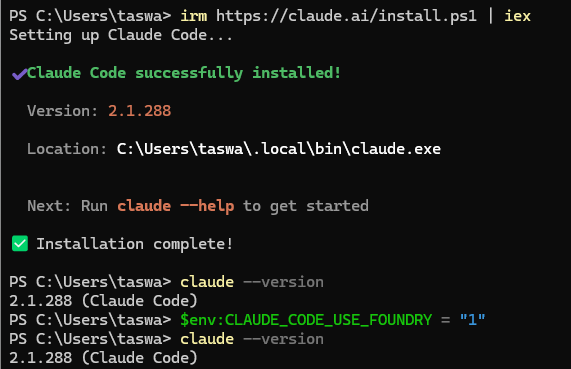
Install Claud Code Cli
Deploy Claude Opus 5.5 from the Foundry Model Catalog to your Foundry resource, same as any other model. Give yourself the Azure AI User or Cognitive Services User role on that resource (either one is enough to call the model), and run az login. No API key: Claude Code falls back to the Azure credential chain when no key is set, so your az login session is the credential. If you plan to use the API Key then you will need to set your env key or the json file to have the ANTHROPIC_FOUNDRY_API_KEY rather.
Remember to install the Extension in VSCode
VSCode Claude
Now the part I care about. Instead of setx-ing environment variables or pasting them into every shell, put them in ~/.claude/settings.json. Both the CLI and the VS Code extension read that file, so you configure Foundry once:
|
1 2 3 4 5 6 7 8 |
{ "env": { "CLAUDE_CODE_USE_FOUNDRY": "1", "ANTHROPIC_FOUNDRY_RESOURCE": "your-foundry-resource-name", "ANTHROPIC_MODEL": "claude-opus-5-5", "ANTHROPIC_DEFAULT_OPUS_MODEL": "claude-opus-5-5" } } |
The two model lines do different jobs, and you want both:
- ANTHROPIC_MODEL makes Opus 5.5 the model for the session. This is the line most guides miss. On Foundry, Claude Code’s default model is Sonnet 4.5, not Opus. Setting only ANTHROPIC_DEFAULT_OPUS_MODEL remaps the opus alias, but you keep chatting with Sonnet until you switch.
- ANTHROPIC_DEFAULT_OPUS_MODEL makes the opus alias (in /model, subagent definitions, and so on) resolve to your Opus 5.5 deployment instead of an older Opus you may not have deployed.
Use your actual deployment name if it isn’t claude-opus-5-5. ANTHROPIC_FOUNDRY_RESOURCE takes the resource name only, not a URL. If you need a private endpoint or custom domain, use ANTHROPIC_FOUNDRY_BASE_URL instead. Don’t set both.
In VS Code, install the Claude Code extension and add one line to your VS Code settings.json so it doesn’t push you toward an Anthropic login:
|
1 2 3 |
{ "claudeCode.disableLoginPrompt": true } |
Then check it, in the terminal or the VS Code panel: /status
You’re looking for the API provider set to Microsoft Foundry, your resource name, and your Opus 5.5 deployment as the model. If the model line says Sonnet, the ANTHROPIC_MODEL line isn’t being picked up.
Dev takeaway: “Deployed in Foundry” and “used by Claude Code” are two different things. /status is the five-second check that tells you which one you’ve got.
Effort: The Dial You’ll Actually Touch
In the SDK post, effort was a property on the request. In Claude Code it’s a session setting, and there are three ways to set it:
- /effort sets it for the current session: /effort high, /effort low, or /effort auto to go back to the model default.
- The /model picker has an effort slider (left/right arrows). Whatever you pick there is remembered per model, so Opus 5.5 can keep its own setting.
- CLAUDE_CODE_EFFORT_LEVEL in the environment or the env block wins over everything else, including /effort.
That last point is easy to trip over: put CLAUDE_CODE_EFFORT_LEVEL in your settings while testing, forget about it, and later /effort high appears to do nothing. For interactive work, leave the env var out and use /effort or the /model slider. Save the env var for scripted or CI runs where you want one fixed level. (The top-level effortLevel user setting also won’t apply to Opus 5.5, which is one more reason to use the per-model slider.)
Here’s how I map the levels to Claude Code work:
| Effort | What I use it for in Claude Code |
|---|---|
| low | “Explain this file”, rename a symbol, write a commit message |
| medium (default) | Everyday feature work, bug fixes, writing tests |
| high / xhigh | Multi-file refactors, framework migrations, tricky concurrency bugs |
| max | Rarely, and only for the session: /effort max when xhigh clearly isn’t getting there |
Thinking tokens are billed as output, at $20/M. Raising effort for the whole day costs you; raising it for one hard problem and dropping back is cheap.
Where the Opus Bill Hides
Pinning everything to Opus 5.5 is easy. The surprise is how much else then runs on Opus 5.5 too.
Background tasks. Claude Code does small jobs behind the scenes, such as generating session titles. On the Anthropic API those go to Haiku. On Foundry they run on your primary model, which is now Opus 5.5, unless you deploy a Haiku model and point ANTHROPIC_DEFAULT_HAIKU_MODEL at it.
Subagents. When Claude Code fans work out to subagents (the Explore agent searching your repo, for example), each one uses the main conversation’s model unless something says otherwise. That’s Opus 5.5 for every file search. If you deploy a cheaper model, route subagents to it:
|
1 2 3 4 5 6 7 8 9 10 11 |
{ "env": { "CLAUDE_CODE_USE_FOUNDRY": "1", "ANTHROPIC_FOUNDRY_RESOURCE": "your-foundry-resource-name", "ANTHROPIC_MODEL": "claude-opus-5-5", "ANTHROPIC_DEFAULT_OPUS_MODEL": "claude-opus-5-5", "ANTHROPIC_DEFAULT_SONNET_MODEL": "claude-sonnet-4-6", "ANTHROPIC_DEFAULT_HAIKU_MODEL": "claude-haiku-4-5", "CLAUDE_CODE_SUBAGENT_MODEL": "claude-sonnet-4-6" } } |
Again, those are deployment names, so use yours. Opus 5.5 does the planning and the edits in the main conversation; a cheaper model does the searching and reading.
Only reference models you actually deployed. Foundry has no startup model check, so Claude Code won’t warn you about a typo or a missing deployment when it launches. You find out mid-session. While drafting this post, a subagent in my own session died with:
|
1 |
<b>The model claude-sonnet-4-5 is not available on your foundry deployment.</b> |
It had tried a model my resource didn’t have. Everything else kept working, which is exactly why it’s easy to miss. If you only deployed Opus 5.5, leave the Sonnet and Haiku lines out and accept that everything runs on Opus.
Dev takeaway: with one deployment, every token is an Opus token. That can be fine, since Opus 5.5 is cheaper than Opus 5, but make it a decision rather than a surprise.
Make the $0.20 Cache Reads Count
Cache reads at $0.20/M are the best part of the Opus 5.5 price sheet, and Claude Code is a cache-heavy workload: every turn re-sends your instructions, CLAUDE.md, and the conversation so far. Caching is on automatically. Three things decide whether you actually get those cheap reads:
- The default cache lifetime on Foundry is 5 minutes. Step away for coffee, come back, and the next turn re-writes the whole context at full price. For long sessions with gaps, set ENABLE_PROMPT_CACHING_1H to 1 in the env block. One-hour cache writes are billed at a higher rate than 5-minute writes, so this pays off for long, stop-and-start sessions, not quick ones. (Recent Claude Code versions also have CLAUDE_CODE_PROMPT_CACHE_TTL=1h, which applies only to the main conversation.)
- Pick your model at the start and stay on it. Switching from Opus 5.5 to Sonnet and back mid-session throws away the cache each time.
- Set up MCP servers before you start. Some Azure-hosted deployments reject Claude Code’s tool search, so it loads all MCP tools up front. Then connecting or removing an MCP server mid-session resets the cache.
Refusals Show Up in Your Editor Now
In the SDK post I made refusal handling a required pattern, because a refusal is a successful HTTP response with no answer in it. In Claude Code you don’t write that handler, but you’ll still see the result: Opus 5.5 declines more requests than Opus 5 in the biology, cybersecurity, and reasoning-extraction categories.
If you work on security tooling (scanners, fuzzers, detection rules), you’ll occasionally hit a decline on a request that looks reasonable to you. Rephrase the request with the defensive context, or do that piece by hand. Don’t try to engineer around the classifier; on a work resource, that’s a conversation for your security team, not a prompt trick.
Checking What You Actually Spent
Inside Claude Code, run /usage (/cost is an alias). On Foundry you get the session’s token counts, a prompt cache line, and an estimated dollar cost at list price. That estimate is great for “did turning effort up just double my session?”, and the cache line tells you whether the 5-minute or 1-hour setting is actually working.
It is not your bill. The real numbers live in Azure Cost Management for the Foundry resource, at whatever price your agreement gives you. Anthropic’s usage dashboards don’t see Foundry traffic at all. For per-developer numbers across a team, Claude Code can export usage through OpenTelemetry. Tagging the Foundry resource (team=…, env=dev) makes chargeback easier.
When Something’s Off
These are the Opus 5.5-specific problems I’d check first:
| Symptom | Likely cause | Fix |
|---|---|---|
| /status shows Sonnet, not Opus 5.5 | Only ANTHROPIC_DEFAULT_OPUS_MODEL is set | Add ANTHROPIC_MODEL with your Opus 5.5 deployment name |
| model … is not available on your foundry deployment | An alias or subagent points at a model you didn’t deploy | Deploy it, or remove that line from env |
| /effort seems to do nothing | CLAUDE_CODE_EFFORT_LEVEL is set and overrides it | Remove the env var for interactive use |
| Bill higher than /usage suggests per session | Background tasks and subagents running on Opus 5.5 | Deploy Haiku/Sonnet and set the Haiku and subagent model lines |
| Every turn after a break is expensive | 5-minute cache lifetime expired | ENABLE_PROMPT_CACHING_1H=1 for long sessions |
| VS Code panel asks you to sign in to Anthropic | Login prompt not disabled | “claudeCode.disableLoginPrompt”: true |
| 401 / 403 | Missing role, or az login in the wrong tenant | Azure AI User or Cognitive Services User on the resource; az login –tenant <id> |
One more: there’s no /logout on Foundry. To switch accounts or tenants, change your az login.
Bottom Line
Opus 5.5 is the first Opus worth testing as your all-day default in Claude Code. It’s cheaper, faster, and medium effort is enough for most work. But “default” has to be deliberate on Foundry. Set ANTHROPIC_MODEL, confirm it with /status, decide whether background tasks and subagents should really run on Opus, and turn effort up only for the problem that needs it.
Configure it once in ~/.claude/settings.json, and the CLI and VS Code both pick it up. Then keep an eye on /usage for a week before you roll it out to the team.
Building AI features in C#? I write about practical, no-hype prompt engineering and Azure AI patterns for .NET developers. Check out Prompt Engineering for .NET Developers — free, no Python required. You can also subscribe for more posts.

Leave A Comment